
.png&w=128&q=90)
What this guide covers: The real difference between chatbots and AI agents, how each one handles customer interactions, and how to explain both clearly to your clients.
TL;DR: A chatbot responds to user inputs. An AI agent acts on them. ChatBot by Text® covers the chatbot layer. Text app offers an AI agent. Understanding where AI agents begin, and chatbots end, makes you a sharper, more credible voice in every client conversation about AI.
Why your clients are confused — and why that's your opening
When clients ask about AI, they're rarely asking a technical question. They're asking whether the thing they've seen in a demo, read about in a trade publication, or heard about at a conference will actually solve their problem. The words "chatbot" and "AI agent" get used interchangeably in marketing copy, vendor pitches, and press releases. No wonder clients can't tell them apart.
That confusion is your opening. The partner who can draw a clear, honest line between the two — without jargon, without overselling either option — is the one who earns trust before the proposal is even written.
This guide gives you that line.
What "AI" actually means when your clients say it
Before getting into the distinction between AI agents and chatbots, it helps to address something that comes up in almost every discovery call: when clients say they want "AI," they're usually describing a feeling, not a specification. They want customer interactions that feel intelligent. They want fewer human agents doing repetitive work. They want customers to get answers faster, without waiting in line.
That feeling can be delivered by both AI tools — but in very different ways, at very different price points, with very different expectations attached.
The confusion exists because even AI-powered chatbots and AI agents simulate conversation in a chat window. Both use natural language processing. Both claim to understand context. Both carry the "AI" label. But the similarity stops at the interface. Under the hood, they're built for fundamentally different jobs.
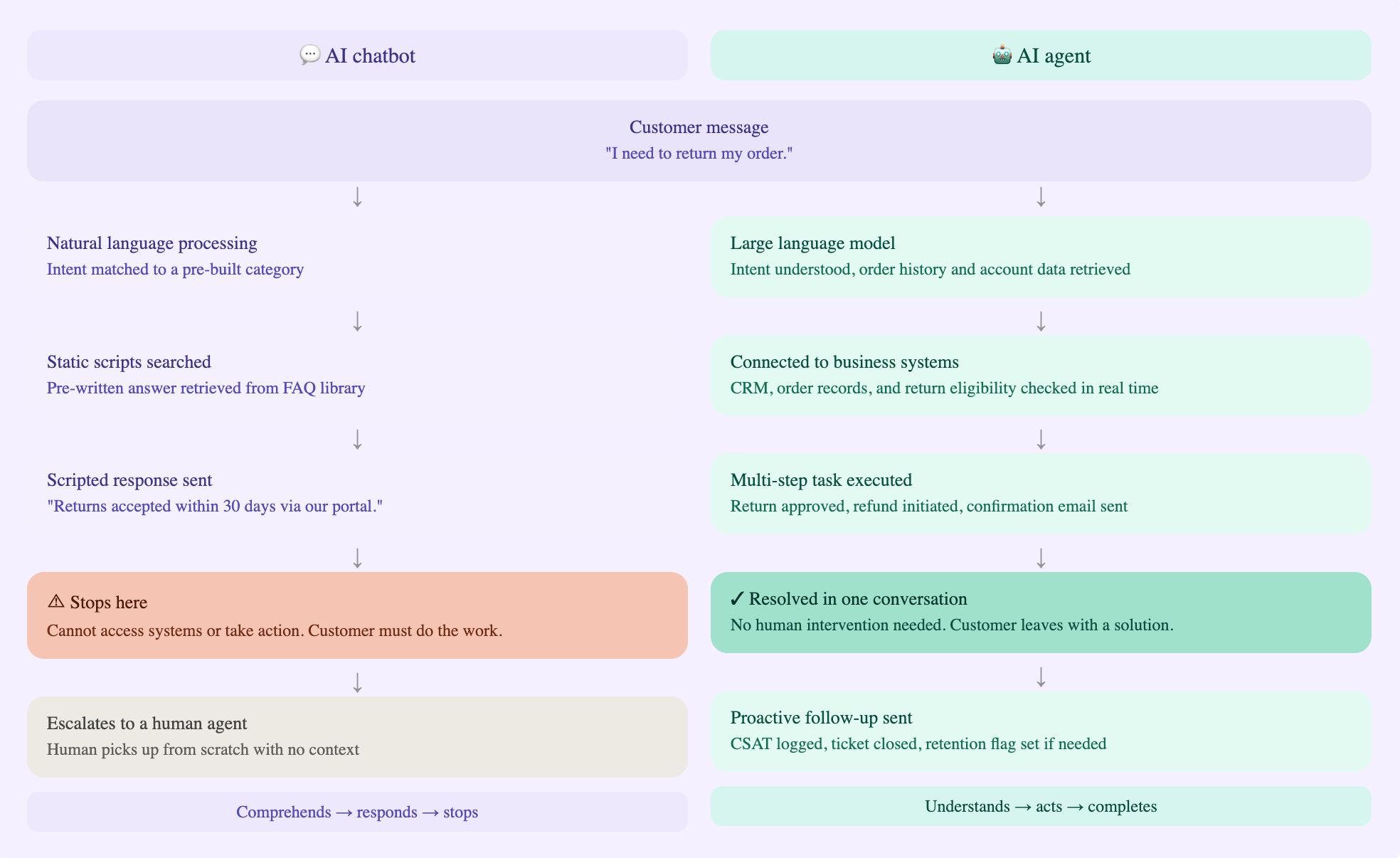
Artificial intelligence in a chatbot is mostly about comprehension — understanding what the user is asking and returning the best pre-authorized response. Artificial intelligence in an agent is about action — understanding what the user needs, accessing the systems required to solve it, and completing multi-step tasks from start to finish without human intervention at each stage.
Everyone has AI. Sell and promote AI that actually does something.
That line exists for exactly this reason. The market is full of AI solutions that process natural language beautifully and then do absolutely nothing with it. The real difference between a chatbot and a sophisticated AI agent isn't how well they understand the question — it's whether they can answer it by actually fixing the problem.
The core distinction, in plain terms
A traditional chatbot is a conversational interface built on predefined tasks and scripted responses. It uses natural language processing — and in modern versions, large language models — to understand what someone is typing, match that to an intent category, and return an appropriate response. It handles customer queries about FAQs, product information, and basic navigation. When it hits something outside its scope, it escalates to human agents.
That's not a failure. For a huge number of use cases, it's exactly the right tool. An AI chatbot that deflects 40% of inbound customer service FAQs before business hours even start is a genuine win for the client's support team.
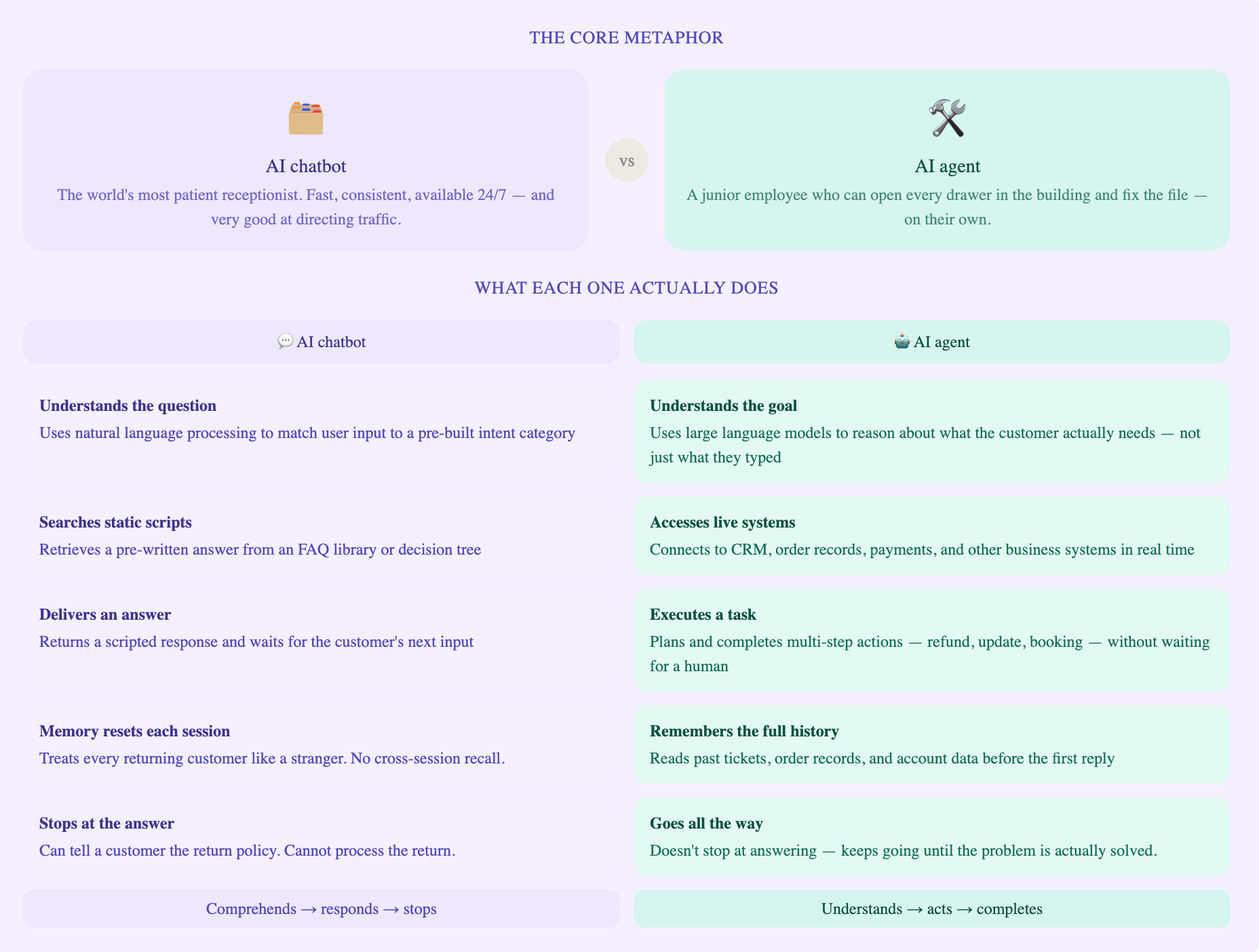
But there's a ceiling. Even AI-powered chatbots, however well they understand context, can't take action in systems they're not connected to. They can tell a customer the return policy. They can't process the return. They can explain a billing cycle. They can't correct the charge. They answer basic questions with clarity and speed, and then stop.
AI agents don't stop there. An AI agent perceives a goal, breaks it into steps, selects the right tools for each step, and executes autonomously. It doesn't just understand customer intent, it acts on it across multiple systems: the CRM, the ticketing system, the payment processor, the order management platform. It completes complex workflows, handles exceptions within set guardrails, and hands off to human agents only when the situation genuinely requires a person.
Think of the distinction this way. A chatbot is the world's most patient receptionist — fast, consistent, available at 3 AM, and very good at directing traffic. An AI agent is a junior employee who can open every drawer in the building and fix the file.
Where they differ under the hood
Here's how traditional chatbots and advanced AI agents compare across the dimensions that come up most in client conversations.
| Dimension | Traditional chatbots | Sophisticated AI agents |
|---|---|---|
| Decision logic | Reactive — matches user requests to static scripts and decision trees. | Autonomous decision making — sets sub-goals, selects tools, loops until complete. |
| Memory | Session-level context only. Each conversation starts from scratch. | Short and long-term memory. Reads CRM history, order records, open tickets, and past contact reasons. |
| Integrations | FAQs, product catalogs, and basic forms. | CRM, ERP, ticketing, payments, calendars, email, and other business systems. |
| Actions | None — routes to human agents or external pages for resolution. | Processes refunds, updates records, books meetings, triggers workflows, and runs complex tasks. |
| Contextual understanding | Identifies intent within a single turn. | Builds full context across multi-turn conversations and connected data sources. |
| Personalization | Basic — name, session context. | Deep — full customer history, account tier, preferences, and journey stage. |
| Escalation quality | Transfers with minimal contextual understanding. | Structured handoff with full summary, sentiment, attempted resolutions, and recommended next action. |
A few of those rows deserve extra attention, because they come up constantly in client conversations.
The memory gap is bigger than it sounds. A chatbot with no cross-session recall treats every returning customer like a stranger. An AI agent that pulls the customer's last three interactions, their account tier, and their open ticket before the first reply delivers a completely different experience — one that builds customer satisfaction over time rather than resetting it with every conversation.
The escalation quality gap matters to your client's support teams too. When a chatbot escalates, the human agent inherits a transcript and starts from the beginning. When an AI agent escalates, the human receives a structured summary, the customer's sentiment, what was already tried, and a suggested resolution path. That changes the economics of human agent time significantly — and it's a detail clients rarely think to ask about until you raise it.
How each one handles a real customer interaction
The easiest way to explain the difference to a client is through a concrete scenario. Here's how a chatbot and an AI agent each handle the same customer situation — a return request on an ecommerce site.
| Stage | What a chatbot does | What an AI agent does |
|---|---|---|
| First contact | Greets the customer, presents a menu or captures intent via keyword recognition | Greets the customer, retrieves their order history from the CRM, and identifies intent from free-form input before the first reply |
| Understanding the request | Matches "return" to a pre-built intent category. Unknown phrasing triggers "I didn't understand." | Classifies the request dynamically, cross-references the order record, checks return eligibility, and builds full context before responding |
| Delivering information | Returns the pre-written return policy and a link to the returns portal | Synthesizes a response tailored to this customer's specific order — item, purchase date, eligibility status, and next steps |
| Resolving the issue | Cannot act. Directs the customer to a form or a human agent. The customer does the work. | Processes the return end-to-end: confirms eligibility, initiates the refund, sends the confirmation, and closes the ticket — in one conversation |
| Escalation | Transfers the conversation. The human agent starts from scratch. | Packages a structured handoff: full conversation summary, sentiment, order details, what was attempted, and a recommended next action for the agent |
| Follow-up | None — session ends when the chat closes | Sends a follow-up message, logs the resolution, and flags the customer if satisfaction signals indicate a retention risk |
Walk a client through that table, and the difference clicks immediately. The chatbot is doing information delivery. The AI agent is doing customer service.
How this plays out in practice
Consider an ecommerce business handling 2,500 customer queries a week. The majority are about order status, returns, delivery estimates, and product availability — repetitive tasks that take a human agent under three minutes each but add up to a high weekly cost.
With ChatBot by Text, the business automates responses to its most common customer service FAQs immediately. The bot uses natural language processing to understand customer intent, matches it to the appropriate response, and resolves between 30 and 45% of basic inquiries without involving the support team. LiveChat handles escalations in real time, with full conversation context attached. Support teams get breathing room, response times drop, and customer satisfaction climbs.
Funded Trading Plus automates 125,000 chats per year using ChatBot by Text, achieving a 93% customer satisfaction rate while cutting their team's workload by at least 18%. Wembley Stadium generated over $1.5M in revenue in eight months with the platform.
These aren't edge cases — they're what well-deployed chatbots do for businesses that commit to training them properly.
An AI agent takes that further. Instead of answering questions about the return policy and stopping, the agent connects to the order management system, checks eligibility, processes the return, sends the confirmation, and closes the ticket — in a single interaction. Resolution rates move from 35% to 70–80%. Human agents shift entirely to complex, high-judgment cases that actually need a person.
Here's how the outcomes compare side by side.
| Metric | With a chatbot | With an AI agent |
|---|---|---|
| Automated resolution rate | 30–45% | 70–80% |
| Human agent involvement | Required for the majority of queries | Reserved for complex, exception-based cases only |
| Customer interactions handled 24/7 | FAQs and basic inquiries | Full transactions — returns, refunds, updates, bookings |
| Escalation handoff | Transcript transfer. Human starts from scratch. | Structured summary with context, sentiment, and suggested resolution |
| Integration required | Minimal — product catalog, FAQ library | Deep — order management, CRM, ticketing, payments |
The objections your clients will raise — and how to answer them
Most client questions about AI agents fall into five categories. Here's how to recognize them and respond with confidence.
| Objection | What the client is really worried about | How to respond |
|---|---|---|
| "We already have a chatbot." | Sunk cost. Fear of admitting the current solution isn't enough. | Ask for their escalation rate. If it's above 60%, the chatbot is answering questions — not solving problems. |
| "AI agents sound risky." | Loss of control. Reputation damage from a bad automated interaction. | Frame it as governance design. Agents only access what you give them. Start with read-only, low-stakes actions. |
| "Our industry is regulated." | Compliance exposure. Auditability. Legal liability. | Two valid architectures exist for regulated industries. Scripted chatbot for consumer-facing. Agent with retrieval-only mode for the back office. |
| "We don't have IT resources." | Implementation complexity. Internal capacity. | That's your job as a partner. The client needs a technical sponsor and API credentials — not a dev team. |
| "The ROI isn't clear." | Budget pressure. Difficulty justifying to the CFO. | Pull their escalation data. Model the cost per human-handled interaction ($8–25). Show the payback period before they commit. |
"We already have a chatbot. Why would we need an agent?"
Ask them one question first: what percentage of their chatbot conversations currently end in resolution rather than escalation to a human agent? For most businesses, that number sits below 40%.
Unlike chatbots, AI agents close that gap by completing the task — not just responding to it. Their chatbot answers questions. An agent solves problems. Those aren't the same product, and that gap has a measurable cost you can pull from their existing data.
"AI agents sound risky. What if it does something wrong?"
This is a governance design question, not a technology veto. AI agents operate within explicit guardrails — they access only the systems you give them access to, under rules you define and control.
The right starting point is always read-only access and low-stakes actions: drafting a response for human approval, retrieving account information, checking order status. Risk scales with the permissions you grant, and those permissions are yours to set.
Machine learning models don't exercise autonomous decision making outside the boundaries you define — and those boundaries are the first thing a good solution partner designs.
"Our industry is regulated. Can we use generative AI in customer-facing roles?"
Yes — but architecture matters. Regulated industries typically need one of two approaches: a chatbot for consumer-facing interactions with fully scripted and auditable outputs, plus an AI agent for back-office processing where the compliance surface is smaller. Or an agent configured in retrieval-only mode, drawing exclusively from your approved document library without the ability to improvise. Both are deployable. The key factors are scoping the agent's access carefully and building the governance layer before go-live.
"We don't have the technical resources to integrate an agent with our systems."
That's exactly the gap a solution partner fills. The client needs to provide API credentials and a technical sponsor — not an engineering team. Some of the most successful agent deployments happen with businesses that have a two-person IT function. You design the integration architecture. You manage the security review. You own the deployment. That's the value the Text Partner Program is built to support.
"We're not sure the ROI is there."
Pull their escalation data together with them. Every time the chatbot fails to resolve and a human agent steps in, there's a hard cost — typically $8–25 per interaction depending on the industry. An AI agent that deflects 30% of those escalations pays for itself within months, not years. You can model it from their current chatbot metrics before they commit to anything.
Interested in knowing more about Text's AI agents and how they can fit in your clients' ecosystems? Sign up for a Text app demo account now, and be sure you're ready when it becomes a part of the Solution model!
Where the real commercial opportunity sits for you
As a Text Partner Program member, every client account you manage contributes to your revenue share tier. The table below shows how the tiers work.
| Tier | ARR threshold | Revenue share | Key benefits |
|---|---|---|---|
| Bronze | Starting tier | 20% on all client accounts | 1-on-1 onboarding, free demo accounts, training materials, full API and SDK access, partner directory listing, and exposure to 35,000+ businesses |
| Silver | ~$5,000 ARR | 22% on new business | Co-marketing opportunities, certified partner status |
| Gold | ~$20,000 ARR | 25% on new business | Dedicated account manager, promotion to Text's customer base |
The program currently has 1,500+ active partners, and the products they sell are trusted by 35,000+ businesses across 150 countries — including Huawei, PayPal, Mercedes-Benz, IKEA, and Ryanair.
Partners in the program have collectively earned over $4,100,000 in commissions in only 2025, and the average referred customer stays active for around three years — meaning the revenue share on a client you land today compounds for the life of that relationship, not just the first invoice.
Bernard May, CEO at National Positions, says: "Products are easy-to-use, the set up is simple, and we receive a great partner discount." Peter Gavrilos, Partner Director at Americaneagle.com, puts it plainly: "This partnership allows our team to provide our customers with the best options in the current communication landscape."
Your next step
Use this guide before a discovery call, a proposal, or any conversation where a client is trying to figure out what kind of AI they actually need. The tables and objection responses are designed to be used directly — adapt the language to your voice and your client's context.
When you're ready to deploy, start with ChatBot by Text for clients who need a fast, low-integration entry point into AI-powered customer service, easing their entry into the AI agent by Text when the Text app becomes part of the Solution program.
To manage your client licenses, set up new accounts, or check your current tier status, head to the Partner console.
Get a summary with