

Users
Three types of users can participate in a chat:Agents
The people on your team. When an agent joins a chat through the Text
interface or via the API, they become a participant. Their messages are
events.
Customers
The people your team talks to. A customer starts a chat and sends messages.
They can have custom properties attached — like their order ID or account
tier.
Bots
Automated participants that act on the agent side. A bot can send messages,
close chats, and handle routing.
Creating bots and issuing bot tokens
Creating bots and issuing bot tokens
Bots are created through the Configuration API. Once you’ve created one, use
the
Issue Bot Token method
to get a token for it, then pass that token as a Bearer token — the same way
you’d use a human agent’s access token. At the protocol level, the Agent Chat
API treats bots and agents identically.Bots here are an API-level concept: custom automated participants you connect
to funnel messages from your own systems into a chat. This is different from
AI Agent, which you set up and
manage directly in the Text app.
Teams
Teams group agents for routing — determining who handles an incoming chat or ticket. The two team types are independent of each other:- Chatting teams — handle live chat conversations, managed through the Configuration API.
- Ticketing teams — handle tickets, managed through the Ticketing API.
Accounts
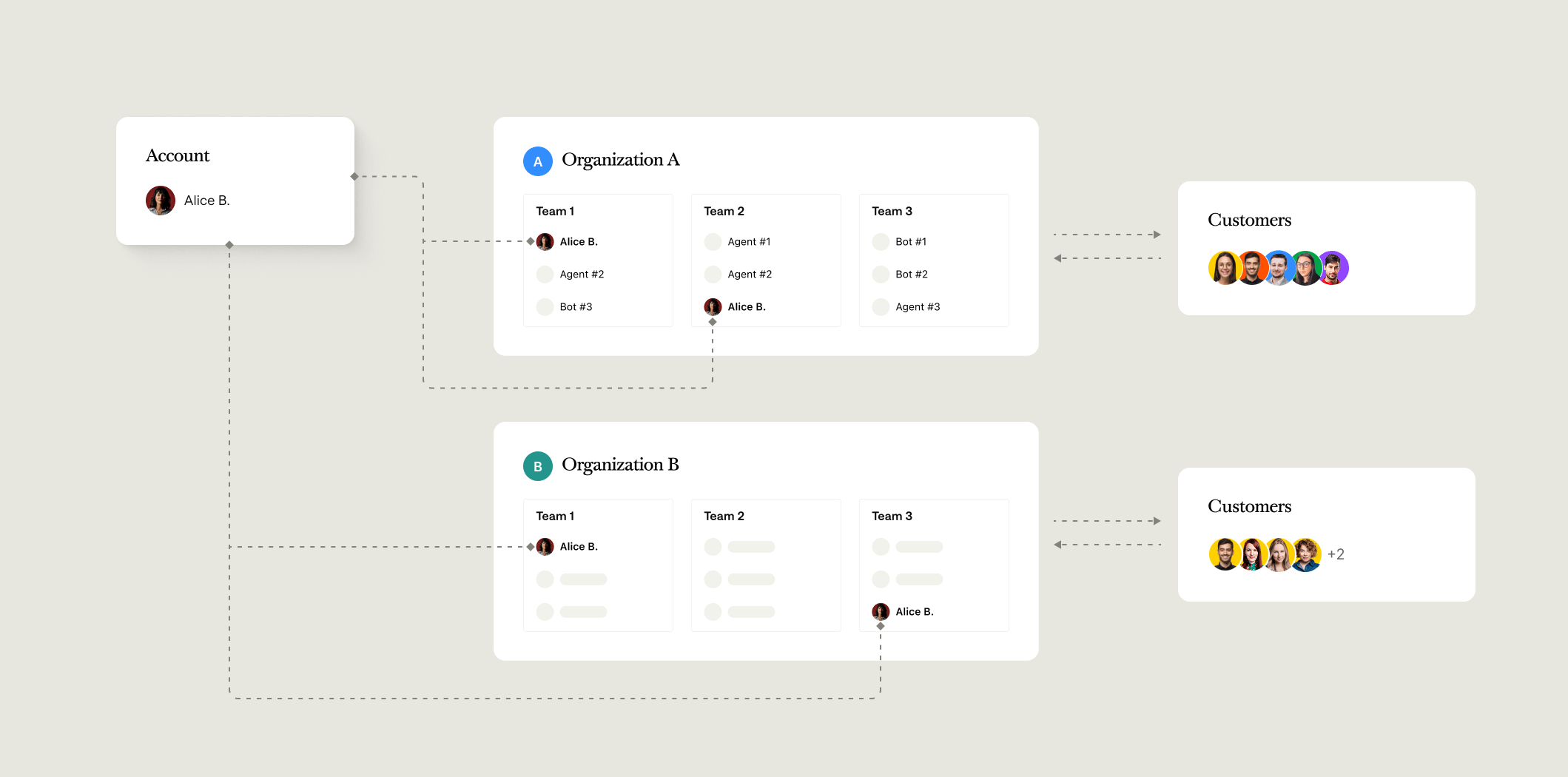
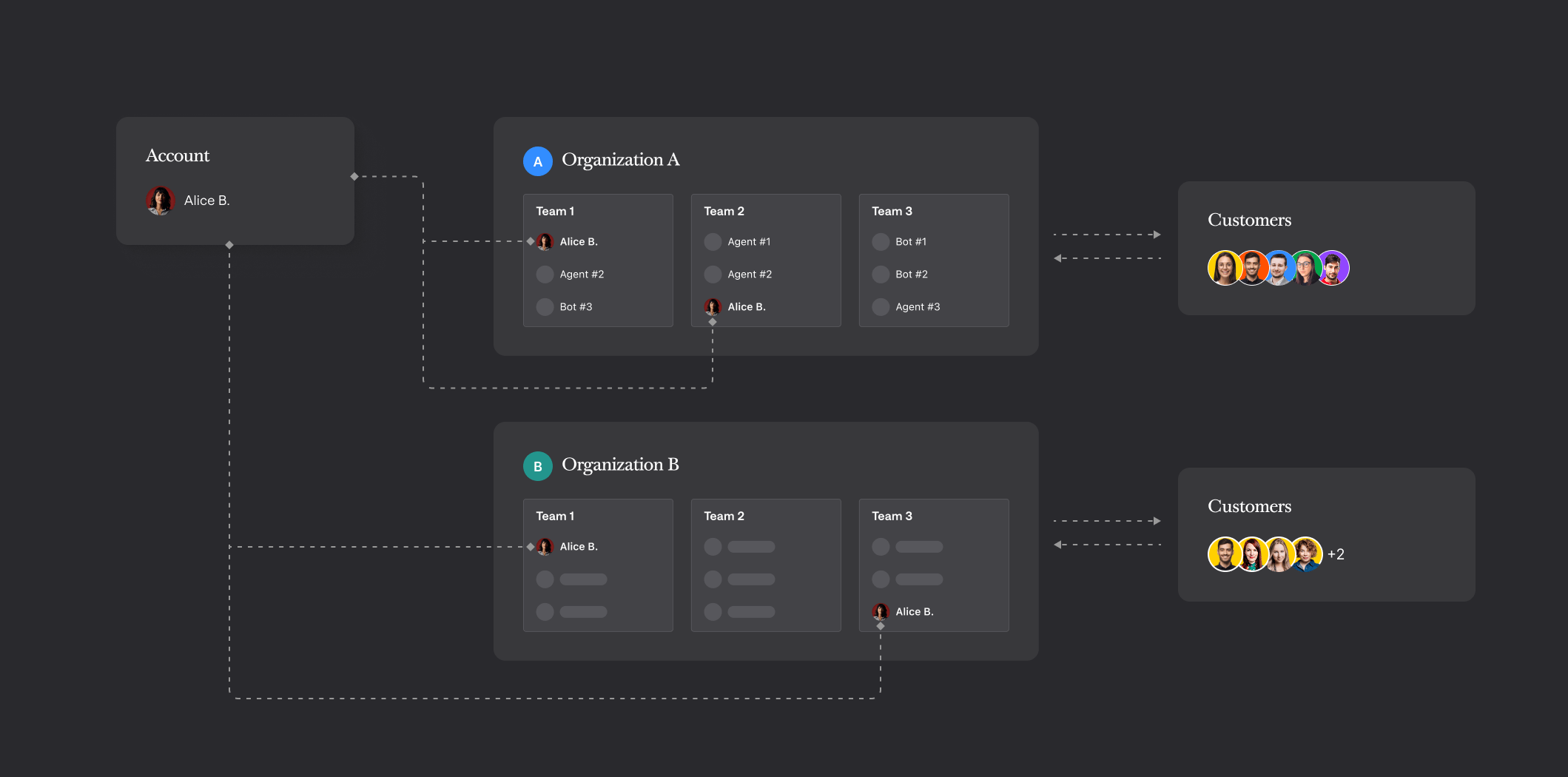
Text’s identity layer is called Global Accounts. It’s the system that manages accounts and organizations across the platform, and it’s exposed through the Global Accounts API. An account is a single identity — one person, one set of credentials — that can access Text. Every account has a uniqueaccount_id (a UUID). When your code makes an API call, it’s always acting as a specific account — the one that owns the token being used.
Organizations
An organization is the workspace that holds a team together. Think of it as the equivalent of what you see in Text as “your company” — the thing with the agents, chats, and settings. A few things to know:- Every organization has at least one account, and at least one owner.
- An account can belong to multiple organizations at once. A consultant working across several client accounts, for example, has one login but can switch between organizations.
- Each account has a default organization — the one it lands on at login.
- Organizations track which Text products are installed on them.
Organization IDs and useful endpoints
Organization IDs and useful endpoints
Every organization has an
organization_id (a UUID). Both account_id and organization_id are included in every OAuth token response, so you always know which account and organization a token belongs to.Two endpoints are worth knowing: GET /organizations/my returns the organization tied to the current token, and GET /info introspects the token itself — returning its scopes, expiry, account_id, and organization_id.Organizations also have an invitation mode. The default, lax, lets all paid roles send invitations. Set it to strict to limit that to privileged roles only.Why this matters for integrations
When you use a personal access token, it’s tied to your account and implicitly scoped to your default organization. When you build an OAuth integration — one where other users authorize your app — the token you receive represents a specific account acting within a specific organization. Both are part of every authorization response.Handling multiple organizations per user
Handling multiple organizations per user
If your app serves multiple Text customers, don’t use
account_id alone as the key for a workspace context — an account can belong to more than one organization. Store (account_id, organization_id) pairs instead.When issuing a customer access token through the cookie grant flow, organization_id is required — the auth server needs it to know which organization the customer belongs to.POST /organizations creates both a new organization and an account in a single call, and doesn’t send any email notifications.