

Chat participants
Three types of users can participate in a chat:Agents
The people on your team. The app calls them teammates, while the APIs
represent them as agents.
Customers
The people your team talks to. Text can associate their records across
browsers, devices, and channels.
Bots
Automated participants that act on the agent side. A bot can send messages,
close chats, and handle routing.
Bots here are an API-level concept: custom automated participants you connect
to funnel messages from your own systems into a chat. This is different from
AI Agent, which you set up and
manage directly in the Text app.
Chat structure
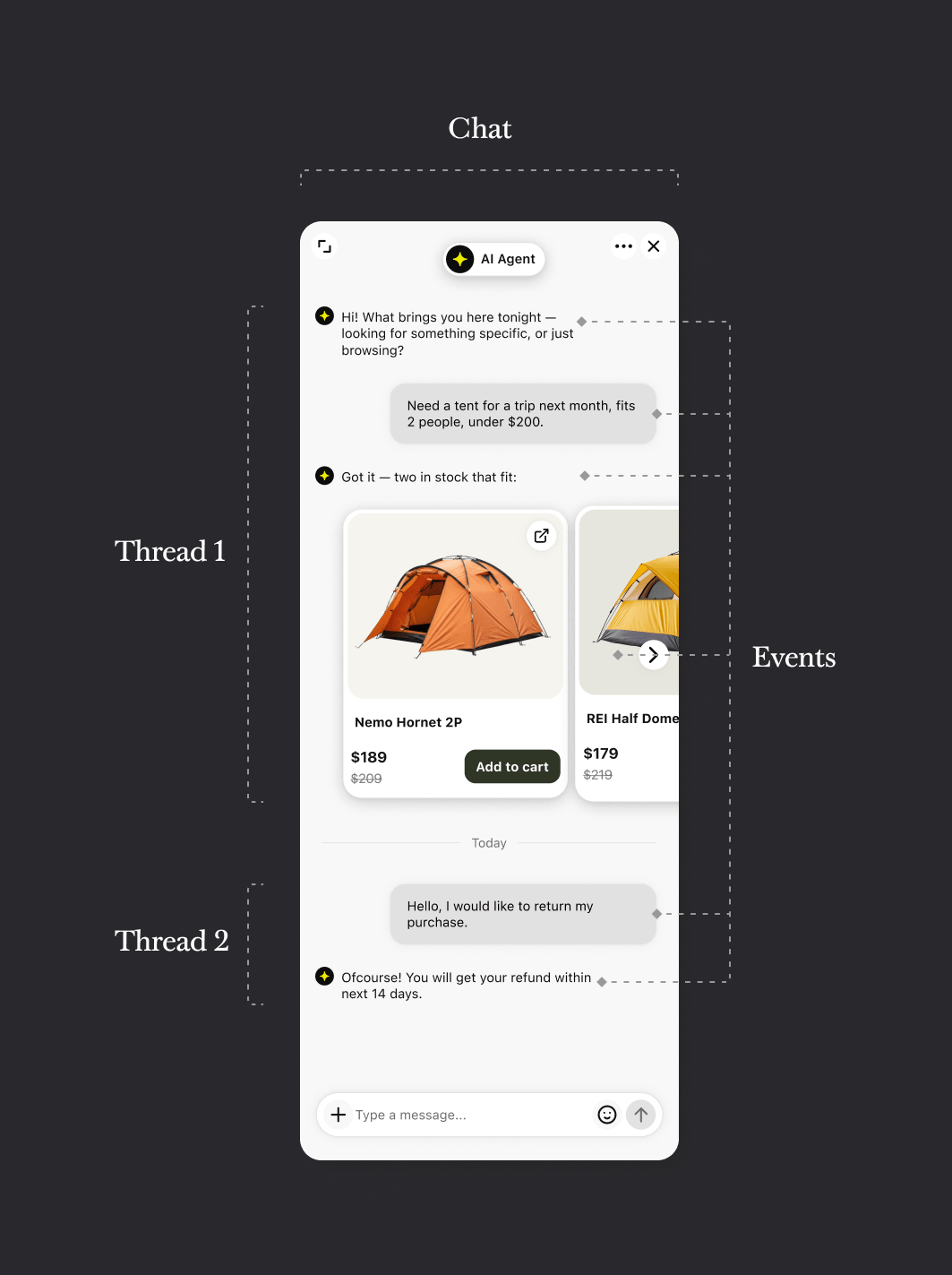
Four resources make up a chat: users, chats, threads, and events. A chat contains threads, a thread contains events, and users participate in the chat and create events.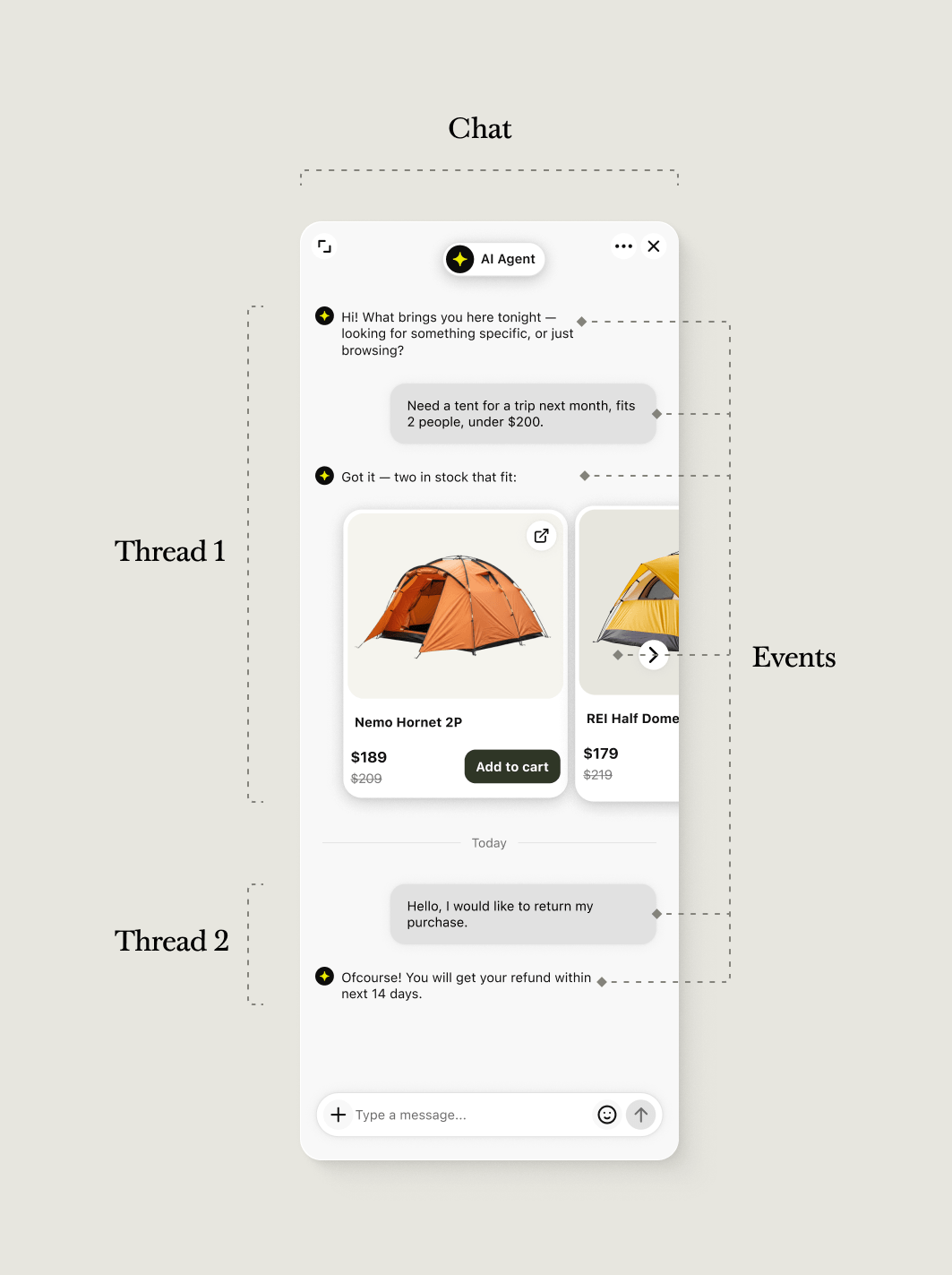
Chats
A chat is the container for an ongoing customer interaction. It stores participants, chat-level properties, and all of its threads. A customer can have only one active chat in an organization. When the customer returns to chat after their conversation ended, the API opens and closes threads within that chat.Threads
A thread is one conversation session within a chat. Starting a chat creates its first thread. Deactivating the chat closes its currently active thread. When the customer returns, Text resumes the deactivated chat and creates another thread in it.Events
An event is one item within a thread, such as a message, file, form, or system activity. Each event has its own author, timestamp, type, and optional properties.Working with chats
Chat lifecycle
The same chat appears through different reads as its state and your purpose change.1
Start a chat
Start chat creates a chat and its
first thread. Store both the returned
chat_id and thread_id.2
Work with the active chat
Use List chats to retrieve chat
summaries available to the agent and Get
chat to retrieve a specific chat. Use
RTM pushes when an application must react as events arrive.
3
Deactivate the chat
Deactivate chat closes the
active thread. The chat and completed thread remain available as history.
4
Read historical sessions
Use List archives to search the
archived view. Use
get_thread_transcript
when you need one session rather than the entire chat record.5
Resume the chat
resume_chat opens a new thread
in an existing chat. It does not create a second copy of the previous
thread.list_chats returns chat summaries available to the agent. list_archives returns archived chats with one thread in each result.
IDs for chats, threads, and events
Use the identifier for the resource that the operation acts on:Tickets
A ticket is a separate work record with its own status, assignee, team, events, and custom fields. A ticket can originate from a chat, but it does not contain the complete chat automatically. When a ticket is connected to a chat, follow its source reference to retrieve the conversation and customer data:- Use Get ticket to retrieve the ticket and read
source.referenceID. - For a ticket created from a chat, pass
source.referenceIDinfilters.thread_idsto List archives. The result contains the chat, the referenced thread and its events, and the customer participant. - Ticket responses do not include a Customer Data Platform customer ID. Pass the customer participant’s
idto Get merged customer to retrieve customer data across associated identities.
Retrieve chat data and receive updates
Text provides three ways to read chat activity. The right choice depends on whether you need state or notification of a change.
An RTM push and a webhook can have similar names without having the same payload or delivery rules. Do not substitute one for the other based on the event name alone. A webhook notification can also contain enough data to process the change or only enough information to retrieve the affected resource.
One change does not always produce one notification for every matching action. For example, an
incoming_chat webhook includes events that started the first thread. Do not expect a separate incoming_event webhook for those same initial events.
Chat records and report totals
The Agent Chat API and Customer Chat API return chat and thread records. The Reports API returns aggregated metrics produced for a reporting dimension and time range. A report is not a query over the exact result set returned bylist_archives.
This distinction affects totals. For example, one chat handled by two agents can contribute to each agent’s breakdown while contributing once to an overall chat total. As a result, adding per-agent values can produce a number larger than the overall total.
Use the Agent Chat API or Customer Chat API when you need chat or thread records. Use the Reports API when you need defined metrics, and interpret each metric according to its dimensions and filters.