
Michał Włosik
Writer
I turn complex topics around customer service, AI, and communication technology into clear, actionable content — from blog posts and whitepapers to case studies and automated content workflows.
TL;DR: Ten WordPress plugins for ecommerce, split into foundation (SEO, speed, security) and revenue (page design, ecommerce, analytics, links). All free to start.
Every plugin in this article earns its spot for one of two reasons: it either helps you generate revenue, or it prevents the kind of problem that stops revenue from happening. A page builder that lets you design product pages that convert does the first. A security plugin that keeps your store from going offline does the second. Both matter, but they're different jobs and belong in different stages of your setup.
There's also a third job none of these plugins cover: answering the question a visitor has right before they buy. That's where Text comes in — we cover that later in the article.
All ten plugins have a free version or free tier. A few serve adjacent functions (two image optimizers, for example), so we've flagged where the right choice depends on your hosting setup.
The foundation: plugins you need before you launch
You wouldn't run ads to a slow, insecure site with no sitemap. These six plugins handle discoverability, speed, security, and recovery. None of them put money in the register directly. All of them make it possible for your revenue tools to work.
Plugin | What it does for your store |
Yoast SEO | Structures your pages so Google can find and rank your products |
EWWW Image Optimizer | Compresses images server-side so product pages load fast |
Smush | Same job as EWWW, cloud-based — better fit for shared hosting |
Hummingbird | Caches pages and minifies code to cut load times across the store |
Wordfence | Firewall, malware scanning, and login security to keep your store online |
UpdraftPlus | Automated backups so a bad update doesn't take your store down |
1. Yoast SEO
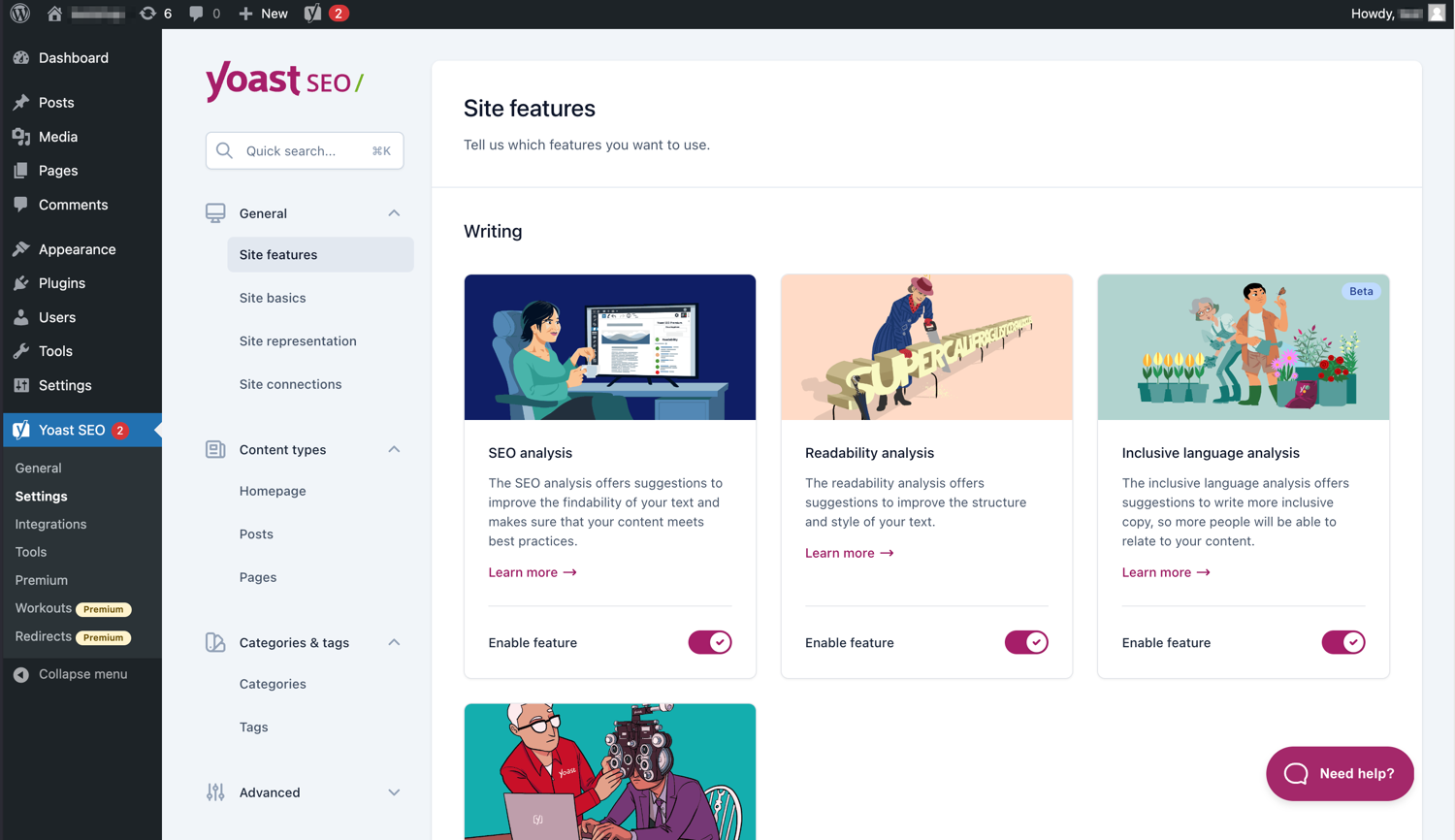 Why it matters: If Google can't find your product pages, neither can your customers. SEO is the cheapest acquisition channel you'll ever have, but only if your pages are structured for it.
Yoast has been around since 2008 and currently runs on over 13 million WordPress sites. The free version handles the fundamentals: focus keyphrases, XML sitemaps, meta titles and descriptions, breadcrumbs, and schema markup. The traffic-light scoring system gives you a quick read on whether a page is optimized before you hit publish.
Where Yoast earns its reputation is consistency at scale. A blog with 20 posts can get by with manual SEO checks. A WooCommerce store with 200+ product pages needs a system that enforces the same structural logic across every listing, category page, and blog post. Yoast does that. And with WooCommerce SEO support, your product pages get proper schema for price, availability, and reviews — which means richer search results and higher click-through rates.
What it does well:
Real-time content and readability analysis as you write
Automatic XML sitemap generation
Schema markup for rich results in search (including product schema with the WooCommerce add-on)
Internal linking suggestions (Premium)
Redirect manager for handling moved or deleted pages (Premium)
What to know before installing:
The free version covers what most small and mid-sized stores need. Premium costs $99/year per site, which adds up fast if you manage multiple domains. If you're starting fresh and budget matters, compare Rank Math (free tier is more generous) before committing.
Pricing | Free; Premium at $99/year per site |
Active installs | 13M+ |
Rating | 4.8/5 on WordPress.org |
2. EWWW Image Optimizer
 Why it matters: Every extra second your product page takes to load increases the chance a visitor leaves before seeing the price. Google's own data says 53% of mobile visitors abandon a page that takes longer than 3 seconds. Images are almost always the biggest culprit.
EWWW takes a server-side approach to image optimization. The free version runs compression locally on your web server using open-source tools (jpegtran, optipng, cwebp), which means unlimited lossless optimizations without sending your images to a third-party API. It also handles WebP conversion, so browsers that support the format get lighter files automatically.
For ecommerce sites, this matters more than you'd think. A product page with six photos, a lifestyle banner, and a size chart can easily weigh 3–5 MB uncompressed. EWWW brings that down without touching your image quality.
What it does well:
Unlimited free lossless compression (PNG savings around 75%)
Automatic WebP conversion for modern browsers
Bulk optimizer for existing media libraries
Lazy loading with responsive image scaling
Works with images from any plugin, not just the media library
What to know before installing:
The free version's lossless compression only shaves about 8–18% off JPEGs. For meaningful JPEG reduction (45–55%), you need the Compress API on a paid plan ($8–32/month). If your store is image-heavy and JPEG-dominant, compare with ShortPixel before deciding.
Pricing | Free; paid plans from $8/month |
Active installs | 1M+ |
Rating | 4.8/5 on WordPress.org |
3. Smush
 Why it matters: Same reason as EWWW — faster product images mean fewer visitors abandoning your pages. Smush just takes a different route to get there.
Smush compresses images through a cloud-based service rather than running tools on your server. Upload an image, and Smush automatically strips metadata, resizes it, and compresses it without visible quality loss. For store owners on shared hosting (where server-side tools like EWWW can spike CPU usage during bulk optimization), Smush tends to be the safer choice.
What it does well:
Automatic compression on upload — no manual steps required
Bulk optimization handles up to 50 images at once (free)
Lazy loading to defer off-screen images
Directory Smush for images outside the media library
CDN delivery with Smush Pro for global performance
What to know before installing:
The free version has a 5MB per-image limit and processes 50 images per bulk run. Smush Pro (part of WPMU DEV membership, from $30/year for a single site) removes those limits and adds a CDN. If your media library is massive, the Pro tier saves a lot of time.
Pricing | Free; Pro from $30/year |
Active installs | 1M+ |
Rating | 4.8/5 on WordPress.org |
4. Hummingbird
 Why it matters: Image optimization reduces what your pages weigh. Caching reduces how often your server has to rebuild them. Together, they determine whether your store loads in 1.2 seconds or 4.
Hummingbird handles browser caching, file minification, GZIP compression, and performance diagnostics. For returning visitors (your most likely buyers), caching is especially impactful — instead of generating every page dynamically on each visit, Hummingbird serves a static version that loads significantly faster. During traffic spikes from a product launch or a sale, this can be the difference between your store staying up and your server going down.
What it does well:
Page caching with granular control over what gets cached
Browser caching configuration for static assets
CSS and JavaScript minification and combination
Performance reports with actionable recommendations
GZIP compression to reduce file transfer sizes
What to know before installing:
Over-aggressive caching can conflict with dynamic elements — logged-in user experiences, chat widgets, real-time analytics scripts. Hummingbird gives you enough control to exclude specific pages or scripts from caching, but test after setup to make sure your checkout, cart, and any live chat tools still work as expected.
Pricing | Free; Pro via WPMU DEV membership |
Active installs | 100K+ |
Rating | 4.6/5 on WordPress.org |
5. Wordfence
Why it matters: WordPress powers over 43% of all websites. That popularity makes it the biggest target for automated attacks. Small sites aren't exempt — attackers look for weak points, not popularity.
Wordfence is the most-installed WordPress security plugin (5M+ active installs), and the free version is legitimately functional. You get a web application firewall that filters malicious traffic, a malware scanner that checks core files against known-good versions, and login security with two-factor authentication and brute-force protection.
For ecommerce specifically, security is non-negotiable. You're processing payment information, storing customer data, and running a business that depends on uptime. A single breach can mean downtime, lost orders, and a Google Safe Browsing warning that keeps visitors away for weeks.
What it does well:
Web application firewall that blocks known attack patterns
Malware scanner with file integrity monitoring
Two-factor authentication for login security
Live traffic view showing real-time visits and attack attempts
Vulnerability alerts for outdated plugins and themes
What to know before installing:
The free version delays firewall rules and malware signatures by 30 days compared to Premium ($149/year). That window matters — when a new plugin vulnerability drops, free users are exposed until the delayed update arrives. For personal blogs, the free tier is fine. For stores that process payments, Premium is worth considering.
Pricing | Free; Premium at $149/year per site |
Active installs | 5M+ |
Rating | 4.7/5 on WordPress.org |
6. UpdraftPlus
Why it matters: A bad plugin update can break your checkout. A database issue can wipe your product catalog. Without backups, recovery means rebuilding from memory — and every hour your store is down is an hour you can't get back.
UpdraftPlus is the most widely used WordPress backup plugin (3M+ active installs) and one of the few that handles both backup and restoration in the free version. You can schedule automatic backups of your entire site — files and database — and store them in remote locations like Google Drive, Dropbox, or Amazon S3.
For store owners, backups also enable confidence when making changes. You can test new plugins, adjust layouts, or update your theme knowing you can revert in minutes if something breaks.
What it does well:
Scheduled automatic backups (daily, weekly, monthly)
One-click restoration from any backup point
Remote storage to Google Drive, Dropbox, S3, and more
Selective backup — choose database, plugins, themes, or uploads
Migration tools for moving sites between servers (Premium)
What to know before installing:
The free version covers the essentials. Premium ($70–$195/year depending on site count) adds incremental backups, migration tools, and more storage destinations. Even if your hosting provider offers backups, having an independent copy stored off-server is insurance you'll be grateful for when you need it.
Pricing | Free; Premium from $70/year |
Active installs | 3M+ |
Rating | 4.8/5 on WordPress.org |
The revenue stack: plugins that help you sell
Foundation is set. Your site is fast, secure, backed up, and discoverable. Now add the tools that create, measure, and capture revenue.
Plugin | What it does for your store |
Elementor | Drag-and-drop page builder for landing pages and product layouts that convert |
WooCommerce | Full ecommerce engine: products, payments, checkout, order management |
MonsterInsights | Google Analytics inside WordPress — see which traffic sources drive sales |
Pretty Links | Branded affiliate and campaign links, tracked and updated from one dashboard |
Text | AI-powered live chat, help desk, and AI agent — turns service conversations into sales |
7. Elementor
Why it matters: The default WooCommerce product page is functional. It is not persuasive. A page builder lets you design landing pages, product layouts, and category pages that are built to convert — with testimonials, urgency elements, and visual hierarchy that guide visitors toward the buy button.
Elementor is the most popular WordPress page builder (10M+ active installs) and gives non-technical teams control over layouts without touching code. The free version ships with 40+ widgets and a container-based drag-and-drop editor. Pro ($59/year for one site) unlocks the theme builder, popup creator, WooCommerce widgets, and form builder — which in practice replaces $150–200 worth of standalone plugins.
What it does well:
Visual drag-and-drop editor with live preview
40+ free widgets, 100+ with Pro
Theme builder for custom headers, footers, archive pages (Pro)
WooCommerce product page design tools (Pro)
Popup builder with targeting rules (Pro)
What to know before installing:
Elementor adds 180–280 KB of CSS/JS per page compared to the native block editor. With a caching plugin (like Hummingbird) and reasonable hosting, the real-world impact is under 200ms for returning visitors. But if you're building a simple blog where page speed scores matter more than design flexibility, the native block editor with a lightweight theme might be the better choice.
Pricing | Free; Pro from $59/year |
Active installs | 10M+ |
Rating | 4.5/5 on WordPress.org |
8. WooCommerce
 Why it matters: This one's obvious. WooCommerce is the transaction engine. Without it, you have a website. With it, you have a store.
WooCommerce powers over 28% of all online stores worldwide. The core plugin is free and handles products, payments, shipping, taxes, and order management. What makes it dominant isn't feature count; it's the ecosystem of extensions and the fact that it inherits all of WordPress's flexibility.
What it does well:
Full product catalog management (physical, digital, subscriptions)
Built-in payment processing via Stripe, PayPal, and dozens of gateways
Flexible shipping rules by zone, weight, or flat rate
Tax calculation with regional support
Extension ecosystem for subscriptions, bookings, memberships, and more
What to know before installing:
WooCommerce is free, but a production-ready store usually involves paid extensions. Payment gateways, advanced shipping, subscription billing, and membership systems all add cost. Budget $200–500/year in extensions for a typical small store. The real cost of WooCommerce isn't the plugin — it's the ecosystem you build around it.
Pricing | Free; extensions vary |
Active installs | 7M+ |
Rating | 4.5/5 on WordPress.org |
9. MonsterInsights
Why it matters: Running a store without analytics is like selling blindfolded. You might be doing fine. You might be leaving half your revenue on the table. Without data, you can't tell the difference.
MonsterInsights connects your WordPress site to Google Analytics 4 and surfaces the metrics that matter — top pages, traffic sources, device breakdowns, conversion events — directly inside your WordPress dashboard. GA4's interface is notoriously complex, and most store owners never dig past the default reports. MonsterInsights pulls the actionable numbers into a format you'll actually look at: which products get the most views, which pages lose attention, which campaigns bring visitors that buy.
For WooCommerce stores, the Pro tier's revenue attribution is where it gets interesting. You'll see exactly which traffic source generated which sale, which blog post assisted a conversion, and where visitors drop off in the checkout flow. That's the data that tells you where to spend your next marketing dollar.
What it does well:
One-click Google Analytics 4 connection (no code required)
Dashboard reports for traffic, content, and ecommerce data
Ecommerce tracking for WooCommerce (Pro)
Form conversion tracking across popular form plugins (Pro)
Real-time visitor stats inside WordPress
What to know before installing:
The free Lite version provides basic GA4 reports. Pro plans start at ~$99.50/year and unlock ecommerce tracking, custom dimensions, and PDF report exports. If you're running a WooCommerce store, the Pro tier pays for itself the first time it shows you a leaking funnel.
Pricing | Free; Pro from ~$99.50/year |
Active installs | 3M+ |
Rating | 4.5/5 on WordPress.org |
10. Pretty Links
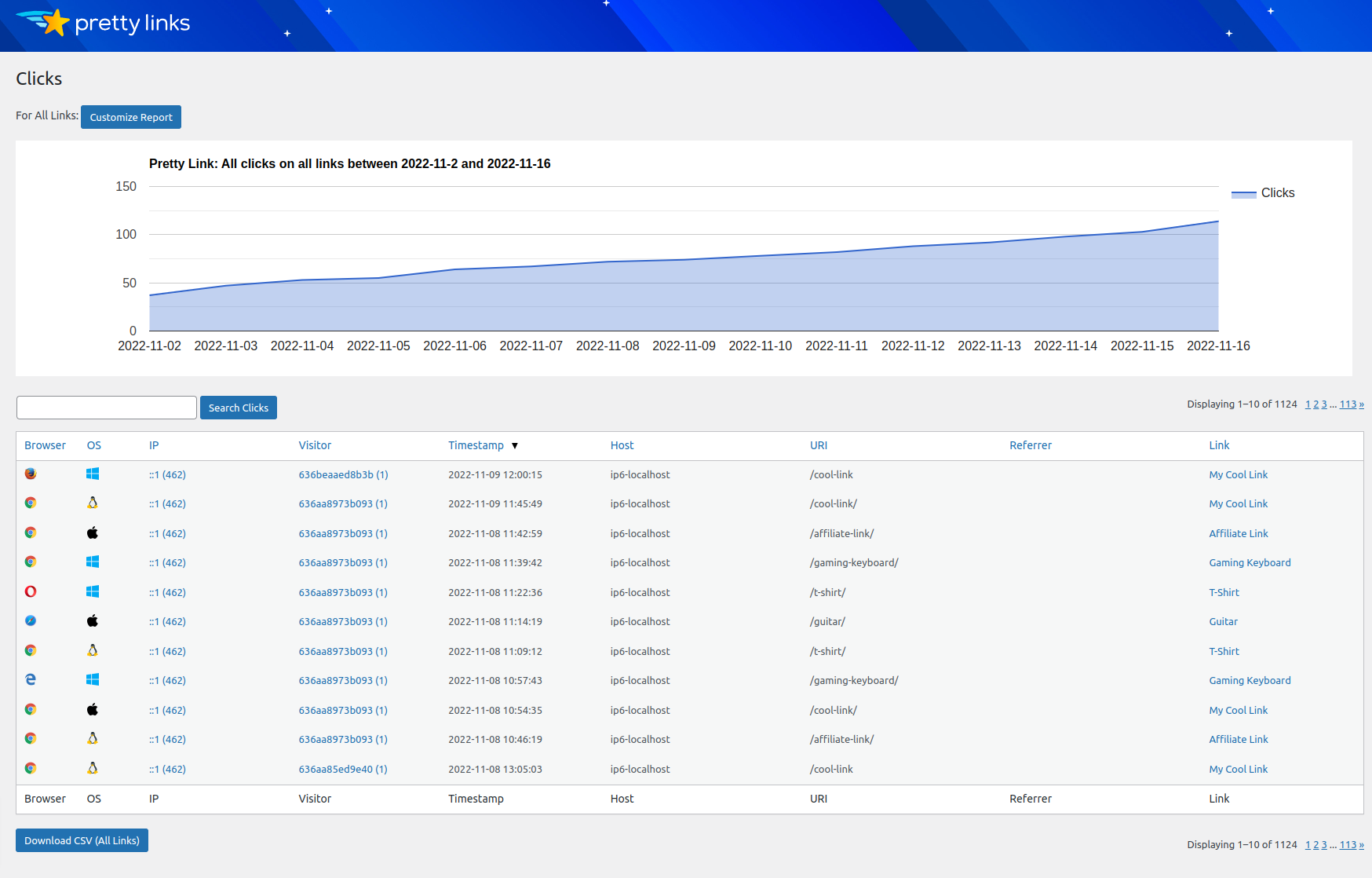 Why it matters: Every affiliate link, campaign URL, and promotional redirect is a revenue touchpoint. If you can't track which ones perform and update them without digging through 50 blog posts, you're leaving money on the table.
Over time, every WordPress site accumulates links everywhere. Blog posts reference products. Email campaigns point to landing pages. Affiliate URLs show up across dozens of posts. Pretty Links centralizes all of it. You create clean, branded URLs on your own domain that can be redirected, grouped, and tracked from a single dashboard. Change an affiliate partner? Update one Pretty Link, and every post using it points to the new destination automatically.
What it does well:
Turns long affiliate or campaign URLs into short, branded links
Tracks clicks with detailed reports (source, browser, OS)
Auto-links keywords across your content to specific URLs
Groups and organizes links for easy management
Supports 301, 302, and 307 redirects
What to know before installing:
The free version handles basic link creation and redirects. The Pro plans ($99.50–$199.50/year) unlock auto-linking, keyword replacement, and product displays. If you're doing affiliate marketing or running campaigns with trackable URLs, the investment pays for itself quickly.
Pricing | Free; Pro from $99.50/year |
Active installs | 300K+ |
Rating | 4.8/5 on WordPress.org |
11. Bonus: Where Text fits in your stack
The ten plugins above handle infrastructure. What they don't handle is the conversation — the moment a visitor has a question and needs an answer before they'll buy.
Most stores treat customer service as cleanup: resolve the ticket, close the chat, move on. Text takes the opposite approach. It treats every conversation as a chance to sell. A sizing question is a buying signal. A shipping inquiry is purchase consideration. A complaint is a customer telling you exactly what it would take to keep their business.
Text is an AI-powered customer service platform that brings live chat, help desk ticketing, and an AI agent into one WordPress workspace. It plugs directly into WooCommerce, so your team or an AI agent can respond while visitors are still on the page — and turn those responses into revenue.
Problem | What's happening | How Text handles it |
|---|---|---|
Sizing and fit uncertainty | Visitor reads the product description, checks the size chart, still isn't sure. Leaves to search Reddit. | AI agent trained on your product specs answers in real time. Visitor stays on the page. |
Shipping cost surprises | Customer adds to cart, sees shipping estimate, hesitates. No one's there to explain the free-over-$50 threshold. | Chat prompt triggers at checkout. Answers the question before the tab closes. |
Return policy confusion | Your returns page gets traffic, but visitors keep asking the same question: who pays for return shipping? | AI agent surfaces the answer in chat. You also learn your returns page needs rewriting. |
Cart stalls | Two items in cart, visitor goes quiet for 90 seconds. Classic decision paralysis. | Live chat or AI prompt offers help choosing. A nudge, not a nag. |
Text is an AI-powered customer service platform that brings live chat, help desk ticketing, and an AI agent into one workspace. It plugs directly into WordPress and WooCommerce.
If your plugin stack covers everything except the moment a shopper hesitates, that's the gap worth closing.
Which plugin should you install first?
If you're starting from scratch, work top to bottom. The foundation plugins should be in place before you start driving traffic. The revenue tools come next, once your store is fast, secure, and discoverable.
If you need to: | Start with: |
Get your products found in search | Yoast SEO |
Speed up image-heavy product pages (server-side) | EWWW Image Optimizer |
Speed up image-heavy product pages (cloud) | Smush |
Cache pages and optimize load times | Hummingbird |
Protect your store from attacks and breaches | Wordfence |
Back up your store before you break something | UpdraftPlus |
Build landing and product pages that convert | Elementor |
Sell products, process payments, manage orders | WooCommerce |
See which traffic sources generate actual revenue | MonsterInsights |
Track and optimize campaign and affiliate links | Pretty Links |
Answer visitor questions and turn hesitation into sales |
FAQ
How many plugins should I install on WordPress?
There's no magic number, but the principle is simple: every plugin you add increases the surface area for conflicts, security vulnerabilities, and performance drag. Aim for 10–15 active plugins that cover distinct functions. If two plugins do similar things, pick one and deactivate the other.
Can I use all 10 plugins from this list at the same time?
Yes, with one exception: don't run both EWWW and Smush simultaneously. They handle the same job (image compression) and will conflict. Pick the one that fits your hosting setup. The other nine plugins cover different functions and coexist without issues.
Should I install the foundation plugins before the revenue plugins?
Yes. SEO, speed, security, and backups should be in place before you start driving traffic or building product pages. Retrofitting SEO onto a site with 50+ published products means manually fixing meta titles, descriptions, and internal links you should have set up from the start. And running ads to a slow, insecure store is spending money to make a bad first impression.
Do I need a page builder if my theme already has customization options?
Depends on how much control you need. Many modern WooCommerce themes offer solid customization through the WordPress Customizer. A page builder like Elementor makes sense when you need custom landing pages, product page layouts, or design elements that your theme doesn't support — especially promotional pages for seasonal sales or product launches.
Is the free version of Wordfence enough for an ecommerce store?
For stores processing payments and storing customer data, Premium's real-time threat intelligence closes a meaningful security gap. The free version delays firewall rules by 30 days — that window matters when a new vulnerability drops. For personal blogs, the free tier is fine. For a store, consider it an insurance premium.
How do caching plugins interact with chat widgets and checkout?
Caching and minification can delay or break real-time features like chat widgets and dynamic checkout pages if configured too aggressively. Most caching plugins (including Hummingbird) let you exclude specific scripts and pages from caching. After setup, test your checkout flow, cart page, and any live chat to make sure everything still works in real time.
What's the best way to add customer communication to a WordPress store?
Start with a tool that combines live chat and AI automation in one platform, so you're not installing separate plugins for chatbots, ticketing, and messaging. Text handles all three from a single workspace, with a native WordPress integration and WooCommerce support. It also provides AI agents that learn from your content and can handle routine questions automatically, so your team focuses on the conversations that actually close sales.