
Michał Włosik
Writer
I turn complex topics around customer service, AI, and communication technology into clear, actionable content — from blog posts and whitepapers to case studies and automated content workflows.
TL;DR: 10 core apps... plus one bonus pick for when you're ready to drive traffic. Page building, SEO, email, popups, reviews, loyalty, product customization, post-purchase. Pick a few to get started and grow from there.
In this article, we picked 10 Shopify apps that cover the core jobs a new store needs handled. Every app on this list has a free plan or a free-to-install option, so you can test before you commit.
We also included two editor's picks at the end: Text for live chat and Influencer Hero for influencer marketing — tools that pair well with the core stack once your store is up and running.
App | Category | What it handles | Rating | Pricing (starts at) |
EComposer | Page design | Page building and layout design | 4.9 ★ (1,500+ reviews) | Free; from $19/mo |
PageFly | Page design | Advanced page building and CRO | 4.9 ★ (12,000+ reviews) | Free; from $18/mo |
MIT Sections Pro | Page design | Theme sections (à la carte) | New listing | Free; per-section one-time |
Growave | Shopify app | Loyalty, reviews, wishlists, referrals | 4.8 ★ (1,226+ reviews) | Free; from $49/mo |
Seguno | Shopify app | Email marketing | 4.9 ★ (~1,000 reviews) | Free; from $35/mo |
Avada | Shopify app | SEO and page speed optimization | 4.9 ★ (1,120 reviews) | Free; from $34.95/mo |
OptiMonk | Shopify app | Popups and on-site personalization | 4.8 ★ (899 reviews) | Free; from $39/mo |
Easify Apps | Shopify app | Product customization and options | 4.9 ★ (2,518 reviews) | Free; from $9.99/mo |
CWILL | Shopify app | Post-purchase: tracking, returns, reviews, loyalty | 4.9 ★ (15,000+ reviews) | Free; varies by app |
Influencer Hero | Shopify app | Influencer marketing, UGC, affiliate tracking | 4.5 ★ (55 reviews) | Free; from $249/mo |
Editor's pick | Live chat and AI agents | Free trial; from $20/mo |
1. EComposer
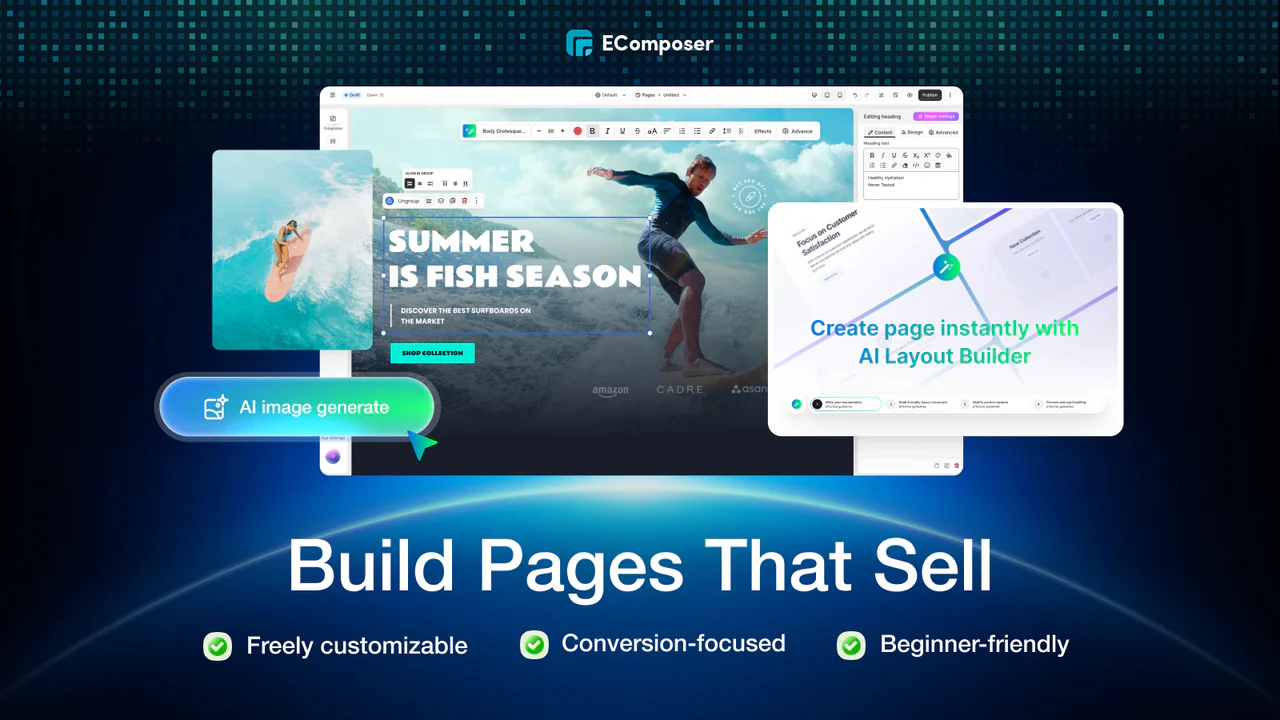 EComposer is a drag-and-drop page builder for Shopify. It handles every page type you'd need when setting up a store: landing pages, homepages, product pages, collection pages, blog layouts, cart pages, footers, and custom sections you can insert into any theme.
What makes it worth it: The live editor shows changes as you make them, which sounds basic until you've used a builder that doesn't. Beyond the editor itself, EComposer ships with built-in functionality that saves you from installing additional apps early on:
260+ section layouts and 100+ page templates to get you started fast
20+ built-in extensions: sticky add to cart, AJAX cart, color swatches, frequently bought together, cross-selling widgets
24/7 live chat support that consistently earns praise for speed and willingness to handle custom CSS
Who it's for: New store owners who want a professional-looking store without writing code. The free plan lets you publish one page, which is enough to test the editor before committing.
2. PageFly
PageFly is the most-reviewed page builder on the Shopify App Store, and it's earned that position by going further than most builders into conversion optimization territory. It covers landing pages, product pages, homepages, about pages, blog pages, and more.
What makes it worth it: Where EComposer focuses on ease of use and built-in extensions, PageFly leans into performance measurement. Each page gets a conversion performance score (A through F) with specific recommendations for improvement. On paid tiers, you get A/B testing to validate what works. Other highlights:
120+ templates, all designed around conversion principles
130+ app integrations (reviews, email tools, personalizers, upsell widgets)
Pixel-level layout control — closer to working in a design tool than a block editor
Built-in analytics tracking page visits, time on page, sessions, and revenue attribution
Who it's for: A better fit if you're comfortable with more complex tools, or if you're working with a designer or agency. Also strong for stores that are past the initial setup phase and want to start testing what converts.
3. MIT Sections Pro by Meetanshi
MIT Sections Pro adds plug-and-play customizable sections to any Shopify theme. Think of it as an à la carte alternative to a full page builder. You browse a library of 130+ professionally designed sections, pick the ones you need, and customize them directly in Shopify's native theme editor.
What makes it worth it: If you've just picked a Shopify theme and it does 90% of what you want but is missing a testimonial block, a trust badge section, or a countdown timer — MIT Sections Pro fills those gaps without requiring a page builder.
130+ pre-designed sections covering galleries, sliders, FAQ blocks, testimonials, trust badges, countdown timers, and more
Sections install directly into your theme editor — no extra dashboard, no code
Lightweight and compatible with most Shopify themes
New sections added regularly
Who it's for: New merchants who like their theme but want a few specific upgrades. A good option if you're not ready for (or don't need) a full page builder.
4. Growave
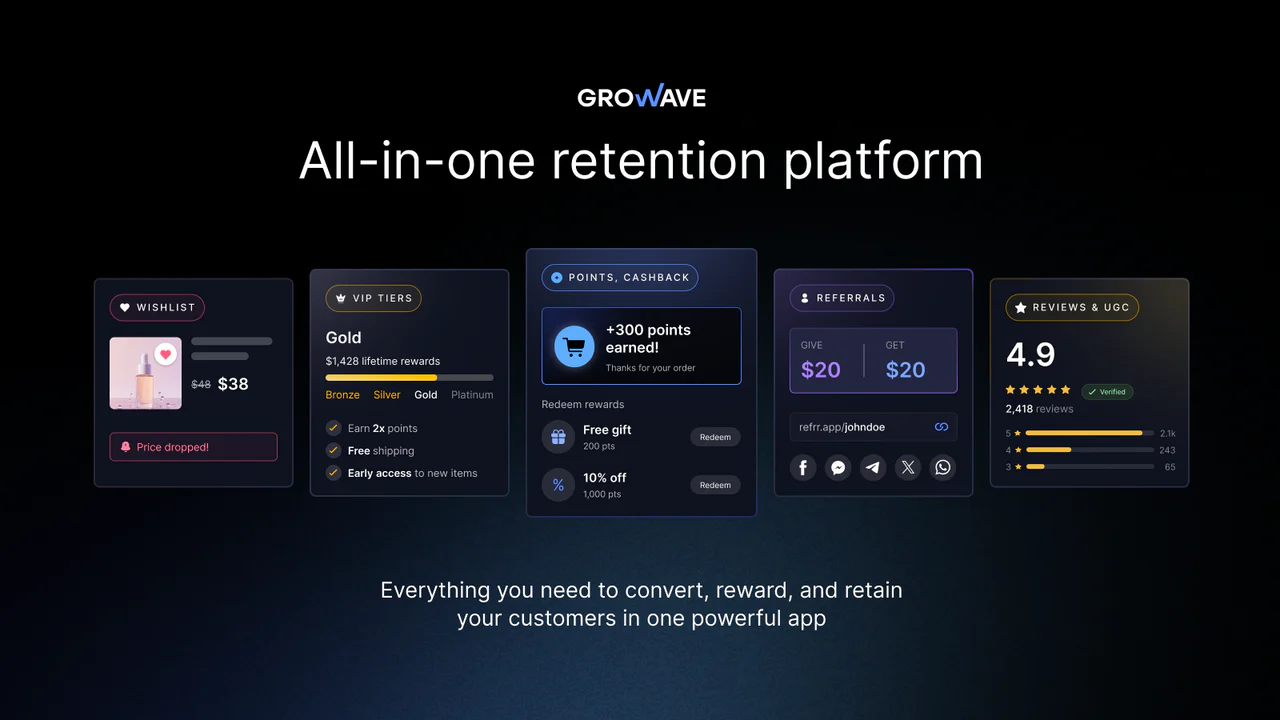 Growave bundles loyalty and rewards programs, wishlists, product reviews and UGC, referral programs, and social login into a single app. It covers the territory that would normally require four or five separate installs — which makes it a natural fit for a lean, early-stage stack. Brands like Stanley, Dermalogica, and Segway use it.
What makes it worth it: When you're starting out, you need reviews to build trust, a wishlist to capture intent, and eventually a loyalty program to bring people back. Growave lets you turn all of that on from one dashboard instead of evaluating and installing separate apps for each. The features work together natively:
Customers earn loyalty points for purchases, reviews, referrals, and account creation
Wishlist emails trigger when items go on sale or come back in stock
Referral rewards stack with the loyalty program, with built-in fraud protection
Reviews sync with Google Shopping for extra visibility
Integrates with Klaviyo, Gorgias, Attentive, Omnisend, and Postscript
If you sell in-store too, Growave plugs into Shopify POS — customers earn and redeem points at the register the same way they do online, using a Loyalty QR code.
Who it's for: New and growing DTC brands that want a retention toolkit without the complexity of managing multiple apps. The free plan covers 100 monthly orders (500 total). Paid plans start at $49/mo (Entry, 500 monthly orders) and scale through Growth ($199/mo), Plus ($499/mo), and Unlimited ($999/mo). All paid plans come with a 14-day free trial.
5. Seguno
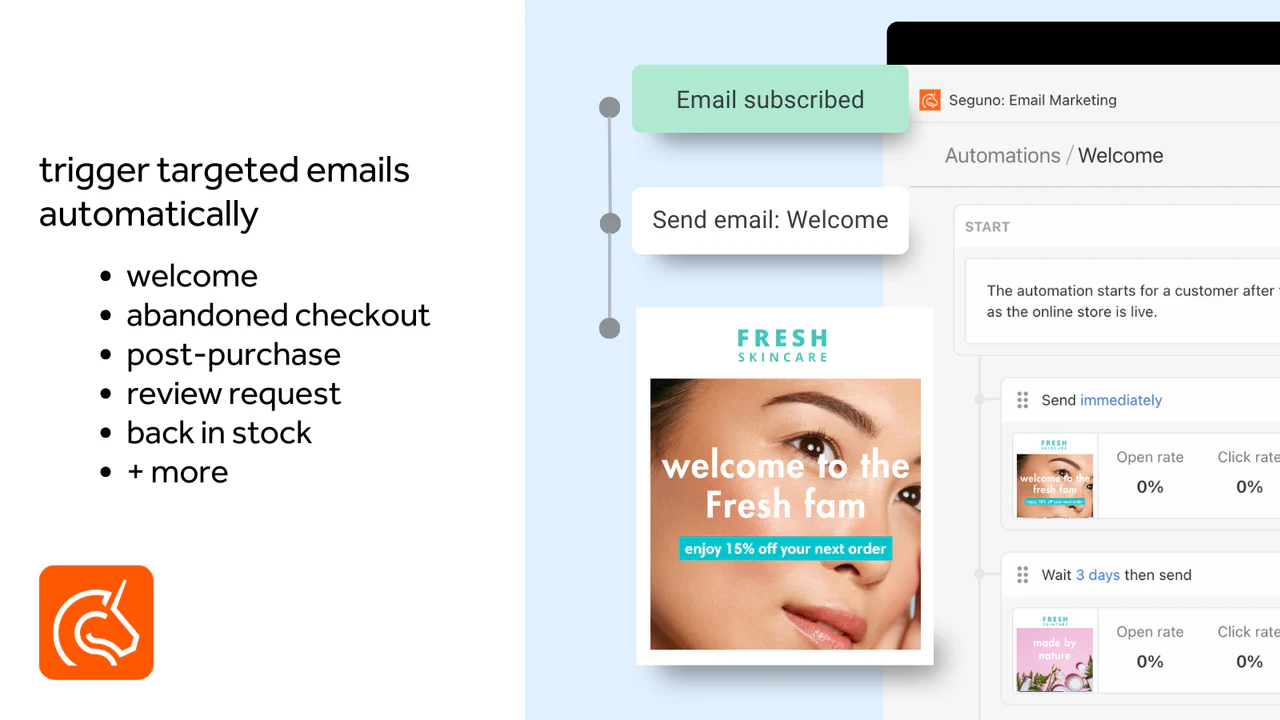 Seguno is email marketing built exclusively for Shopify. The entire app lives within the Shopify admin. You create emails, set up automations, manage subscribers, and track revenue without ever leaving your store's backend.
What makes it worth it: If you're new to email marketing, the last thing you need is a separate platform with its own login, its own learning curve, and its own syncing headaches. Seguno avoids all of that by operating entirely inside Shopify. Your segments, discount codes, product data, and customer tags are immediately available. The marketing suite includes:
Email campaigns and automation (welcome series, abandoned cart, post-purchase)
Popups and forms for subscriber capture
Product reviews
Back-in-stock restock alerts
Canva integration for email design
Who it's for: New Shopify merchants who want to start building an email list from day one without the complexity of platforms like Klaviyo. The free plan covers up to 250 subscribers, which is enough to get your first campaigns running. For a deeper look at how email and chat automation work together, see this guide to marketing automation strategy.
6. Avada AI SEO Suite Optimizer
Avada's flagship is the AI SEO Suite Optimizer. It handles SEO audits, image compression, page speed optimization (lazy loading, minification), meta tag management, structured data (JSON-LD), sitemap generation, broken link redirects, and Google Search Console integration.
What makes it worth it: SEO is one of those things new store owners know they should do but rarely have the expertise for. Avada's AI SEO Audit Agent scans your pages and tells you exactly what to fix — then lets you apply most fixes in one click. That guided workflow is the real product. It covers both sides of the SEO equation:
Technical: structured data, sitemaps, redirects, image compression, lazy loading
Content: meta tags, alt text, keyword optimization, SEO analysis with recommendations
Who it's for: New stores that want organic traffic but don't have (and can't yet afford) a dedicated SEO person. The free plan handles 50 products per month, which covers most new stores.
7. OptiMonk
 OptiMonk is an AI-driven popup builder and website personalization platform for ecommerce. It creates targeted popups, exit-intent overlays, dynamic banners, and upsell offers based on visitor behavior, cart contents, and page context.
What makes it worth it: Most new stores set up a basic email popup and leave it. OptiMonk lets you do more with the traffic you're already getting. The AI generates popups that match your brand and A/B tests them automatically. The targeting goes beyond basic timing — OptiMonk uses real-time Shopify data to show messages based on what's actually in a customer's cart. Merchants report newsletter opt-in rates jumping from below 1% to over 3%. Key capabilities:
Cart value triggers and product-level targeting
Product recommendations inside popups
Auto-applied discount codes
Revenue attribution tied directly to Shopify orders
Native Klaviyo integration
Who it's for: Stores that are starting to get traffic and want to capture more of it. The free plan is generous enough for early-stage stores. The paid tiers become worthwhile once you're past 10K monthly visitors.
For more on how AI-powered widgets reshape the on-site experience, we wrote a separate deep dive.
8. Easify Apps
 Easify builds a suite of Shopify apps centered on product customization. The flagship — Easify Custom Product Options — lets you add unlimited custom options to products: text fields, dropdowns, file uploads, image uploads with live preview, color pickers, date pickers, conditional logic, and dynamic pricing.
What makes it worth it: Shopify's native limit of three option types and 100 variants is a hard wall for stores selling personalized products. If your business depends on customization — engraving, monograms, custom sizing, gift messages — you'll hit that wall fast. Easify removes it. The live preview product personalizer is the standout feature: customers see their customization rendered on the product image in real time before buying. The suite also includes:
Box Bundle Builder (4.9 stars, 230 reviews) for mix-and-match bundles
Product Attachments (4.9 stars, 120 reviews) for adding PDFs, manuals, or spec sheets
Conditional logic to show or hide options based on customer selections
Who it's for: New stores selling personalized or made-to-order products — jewelry engraving, custom printing, embroidery, gift messages, custom sizing. If your products don't need customization options, you can skip this one.
9. CWILL
 CWILL (formerly Channelwill) is a post-purchase and retention platform for Shopify. Their suite covers order tracking, returns and exchanges, reviews and UGC, loyalty and referral programs, SEO tools, an AI chatbot, and more. Over 30,000+ Shopify and Shopify Plus merchants use their apps, including brands like Ka'Chava, Stila, and lovepop.
What makes it worth it: Once orders start coming in, you need to handle tracking, returns, and review collection. CWILL's apps share a data layer, so instead of bolting together separate tools, the post-purchase experience works as one connected flow:
Order tracking feeds into a branded tracking page, which surfaces upsell opportunities
Returns trigger exchanges instead of refunds, preserving revenue
Reviews tie into the loyalty program — customers earn points for writing them
All major apps carry the Built for Shopify badge
4.9-star average across 15,000+ total reviews on the Shopify App Store and G2
Who it's for: Stores that are starting to process real order volume and need to handle tracking inquiries, returns, and review collection without it eating up all their time. The free plans across most apps let you start before revenue justifies the paid tiers.
10. When you're ready to drive traffic: Influencer Hero
 Influencer Hero is an end-to-end influencer marketing platform. You find creators across Instagram, TikTok, YouTube, Pinterest, and Facebook, automate outreach sequences, manage relationships in a CRM, ship products via $0 Shopify orders, and track which creators actually drive revenue — affiliate links, discount codes, and sales attribution all in one dashboard.
What makes it worth it: The Shopify integration goes deeper than most influencer tools. You can auto-generate affiliate links and unique discount codes tied to individual creators, then track sales at the product level. Campaign management, gifting, content collection, and ROI reporting all live in one place. For brands that treat influencer marketing as a revenue channel rather than an awareness play, that consolidation matters.
Who it's for: DTC brands that have a working store and want to scale traffic through creator partnerships. The self-serve platform works well for teams with dedicated marketing staff. Smaller brands without that bandwidth should look at their managed service option. Note that paid plans start at $249/mo, so this is a tool you add once you have revenue to reinvest — not on day one.
11. Bonus: Where Text fits in
The apps above handle the store itself — the pages, the SEO, the emails, the popups, the reviews, the post-purchase flow. What none of them cover is the live conversation: the moment a visitor has a question and the answer determines whether they buy or leave.
That's where Text comes in. It integrates directly with Shopify — pulling in live cart data, order history, and customer context so agents (and AI) can answer questions with full commercial awareness. A few combinations that work particularly well for new stores:
Combo | How it works |
|---|---|
EComposer or PageFly + Text | You build a polished product page. A visitor lands, likes what they see, but hesitates on sizing or shipping. Text catches that question in real time before the visitor bounces. |
Avada + Text | Avada improves your search rankings, so more organic traffic arrives. Text makes sure those visitors get answers instead of hitting the back button. |
Seguno + Text | Seguno sends an abandoned cart email that brings a shopper back to your store. Text picks up the conversation live when they return — already knowing what's in their cart and what made them leave. |
Easify + Text | A customer is configuring a custom product — engraving, monogram, custom size — and gets stuck. Text answers the question right there, before the customer abandons a half-finished order. |
Growave or CWILL + Text | Reviews and loyalty build long-term trust. Text handles the immediate moment — the shopper who's read three reviews and still has one last question before adding to cart. |
Influencer Hero + Text | Creator campaigns drive traffic in spikes. When a creator's audience floods your store, they land with questions about sizing, shipping, and availability. Text’s AI Agent can resolve those inquiries and close the sale before the traffic bounces. |
The pattern is the same in each case: the app does its job, the visitor reaches a point where they need a human (or an AI agent), and Text picks up from there. One more app in the stack, but the one that turns the rest of them into revenue.
FAQ
How many apps should a new Shopify store install?
There's no magic number, but most successful new stores run somewhere between three and six apps. The common mistake is installing 10+ apps before the store has traffic, which slows down page load and creates maintenance work that doesn't pay off yet. Start with a page builder, an email marketing tool, and an SEO app. Add review, loyalty, and popup tools once you have enough visitors and orders to make them worthwhile.
What does the "Built for Shopify" badge actually mean?
It means Shopify has reviewed the app's code quality, performance, design, and user experience — and confirmed it meets their highest standards. Apps with this badge are also required to stay compliant with platform updates, so they're less likely to break after a Shopify release. Not every good app has the badge, but it's a reliable quality signal when you're comparing options you haven't tried yet.
Do I need a page builder if my Shopify theme already looks good?
Not necessarily. If your theme handles 90% of what you need, a lighter option like Section Store (which adds individual sections to your existing theme) might be enough. Full page builders like EComposer and PageFly make more sense when you need custom landing pages, heavily customized product pages, or layouts your theme doesn't support. The free plans on both let you test with one published page before deciding.
Should I install a loyalty app from day one?
Probably not on day one. Loyalty programs work best when you have repeat customers to reward. If you're still getting your first sales, focus on the basics — a solid store design, email capture, and SEO. Once you're seeing repeat traffic and a steady order volume, apps like Growave or CWILL's loyalty tools become much more effective. That said, installing a review collection tool early makes sense — even a handful of real reviews helps build trust with new visitors.
Can too many Shopify apps slow down my store?
Yes. Many apps add JavaScript to your storefront, and that code runs every time a page loads. The impact varies — lightweight apps like Section Store barely register, while heavier apps with multiple scripts can add noticeable load time. The fix isn't to avoid apps entirely, but to be deliberate about what you install. Audit your apps quarterly: if something isn't earning its place, uninstall it. A store running five well-chosen apps will outperform one running fifteen mediocre ones. For more on how AI in customer service can reduce the need for additional tools, that's worth a read too.