May 8, 2026
Targets land in single-metric reports
Managers can set a target on any single-metric report, manually or by accepting a suggested value based on recent results. Now every report has a line on it that says what good looks like.
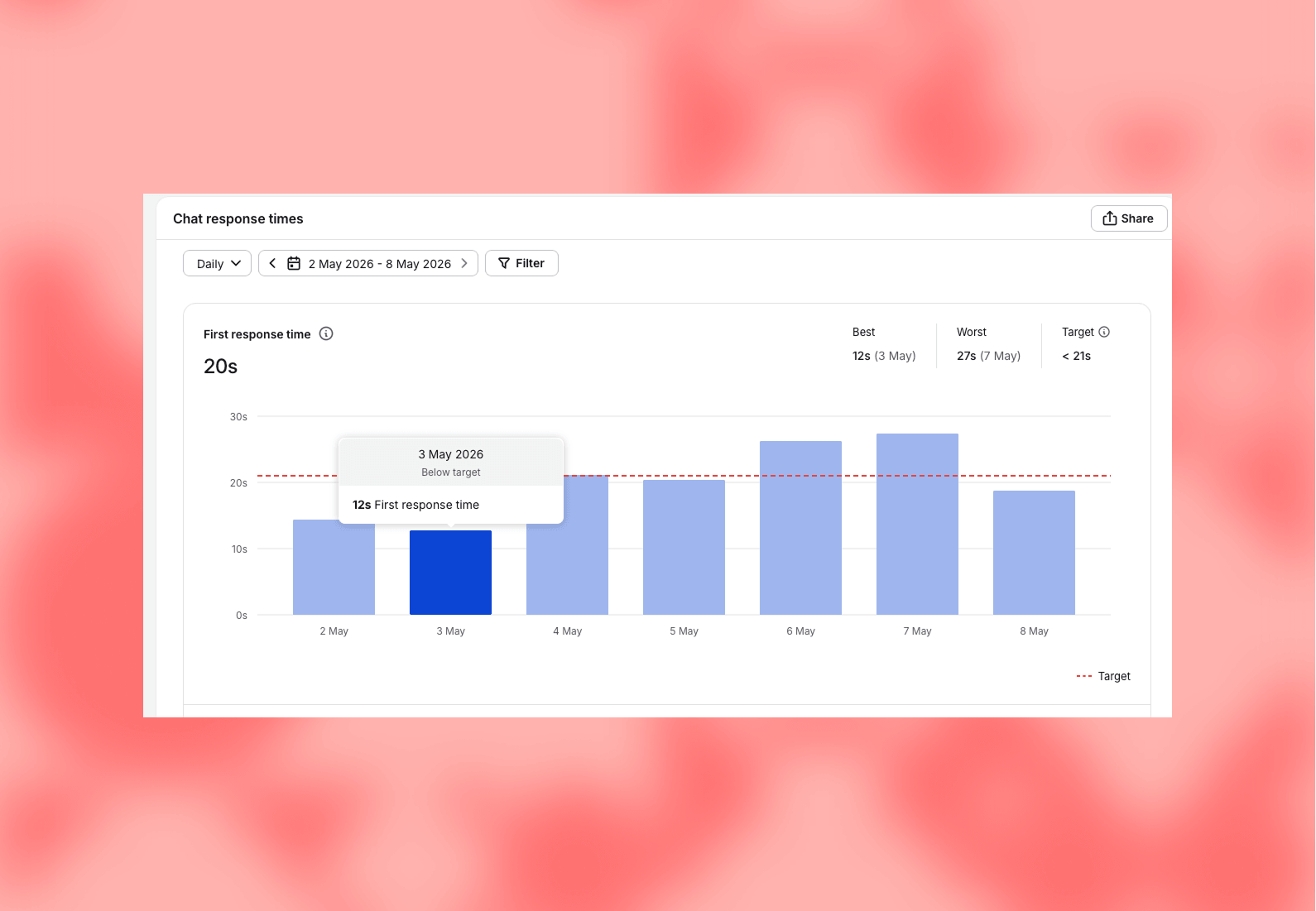
Every single-metric report in Text now supports a target. Managers can set one manually or accept a system-suggested value based on recent results. Once a target is set, the report shows actuals against it, so you see at a glance whether the team is on pace or behind.
How target setting works
Open any single-metric report, set the target. The system can suggest a value based on what the team has been hitting recently, which is the fastest way to get a useful target without staring at the chart for an hour.
The target shows up on the report alongside the actual numbers. Whether you're hitting it or falling short is visible from the top of the page.
Why managers asked for this
A report without a target is descriptive. It tells you what happened. Whether what happened is good enough is left to the reader. For a manager running a service team that's expected to drive sales, qualify leads, or hold a response time, the gap between "this happened" and "this is acceptable" is the part that matters most.
A descriptive report can still hide a problem. A report with a target on it makes the problem look like one. Same data, different signal.
The team's stated goal: help managers spot wins faster and keep teams pointed toward continuous improvement. Once targets are routine, the team stops measuring activity for its own sake and starts measuring against an outcome they chose.