
Michał Włosik
Writer
I turn complex topics around customer service, AI, and communication technology into clear, actionable content — from blog posts and whitepapers to case studies and automated content workflows.
TL;DR The version of WhatsApp you sign up for decides almost everything: how many agents can answer, whether you get an AI Agent, and what Meta charges you. Pick wrong and WhatsApp ends up in a second inbox nobody checks. This guide covers which version you need, how to set it up, the features that matter day to day, and what to look for in the software around it. At the end, we show how Text treats WhatsApp as a native channel, in the same inbox as web chat.
A customer messages you on WhatsApp at 9:14 p.m. asking whether the dress comes in a size 8. Your team is offline. You reply at 10:03 a.m., and the customer has already bought from someone else.
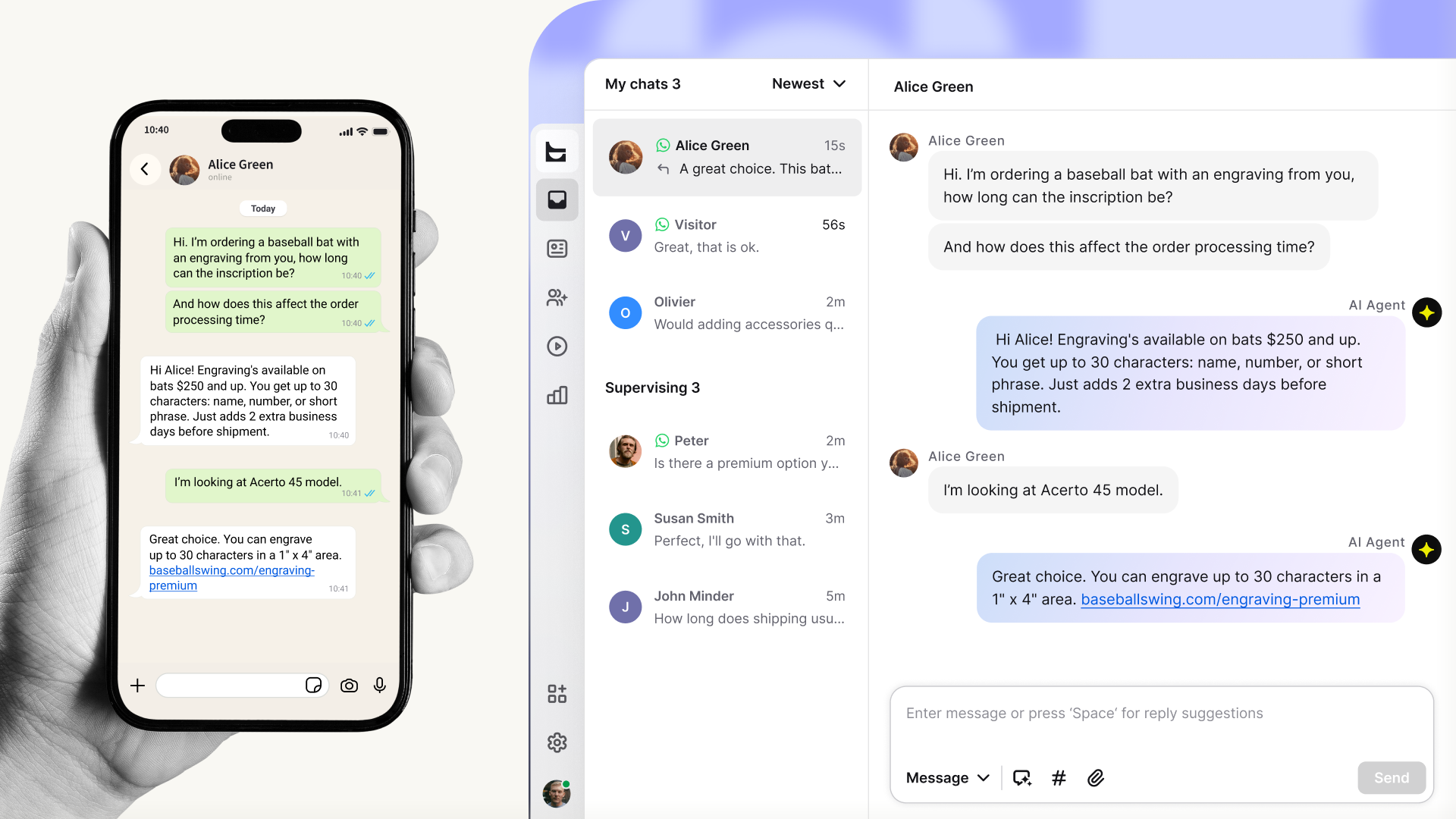 WhatsApp has more than three billion monthly users, most of them opening the app several times a day, and shoppers increasingly default to it for talking to a business. For support teams, the question stopped being whether to be on WhatsApp. It's how to run it well without a second tool, a second inbox, and a second set of habits.
This guide covers which version of WhatsApp Business fits which team, how to set it up, the features that matter once you're live, and what to look for in the software around it.
Why support teams use WhatsApp
Open rates. Email opens typically sit in the 20–30% range. WhatsApp runs far higher, with opt-in broadcasts landing in the 60–80% range and most messages read within minutes.
Async by default. A WhatsApp thread doesn't end when the customer closes the app. They ask, get on with their day, and come back later. Your team isn't penalized for not replying in fifteen seconds, and customers aren't penalized for stepping away.
Reach on the channel customers already are. In big chunks of Europe, Latin America, India, the Middle East, and Southeast Asia, WhatsApp is the default messaging app. Meeting customers there keeps the conversation where it started.
The catch: customers don't see WhatsApp as a separate channel. If you offer it, they expect the same quick response they'd get on web chat or email. That means the inbox, routing, and AI agent need to cover WhatsApp the same way they cover everything else – otherwise buying signals leak out quietly. A product question before checkout, a returning customer checking on an order, a complaint that could be a save. If those messages live in a second app only one person checks, you're losing the conversations that matter most.
WhatsApp Business app vs. WhatsApp Business Platform (API)
The single most confusing part for teams getting started.
WhatsApp Business app. Free mobile app with a business profile, catalog, away message, and labels. Runs on one phone, up to four linked devices. Fine for a solo founder, a two-person store, or a local service business handling a handful of messages a day.
WhatsApp Business Platform. Often called the WhatsApp Business API. The real product for support teams. No app of its own. You connect your number to software that handles the conversations: shared inbox, AI Agent, routing, reporting. Multiple agents answer at the same time. You can integrate it with your help desk, ecommerce platform, and customer profiles.
If your team is more than two or three people, or if you want AI automation, routing, or analytics, you need WhatsApp Business Platform. WhatsApp Business app caps out fast.
The next questions are which platform partner to use and what it costs once Meta's per-message pricing kicks in.
How to set up WhatsApp as a support channel
Assuming you're using a platform like Text that handles the Meta side:
1. Pick the number. New line or an existing business line. If the number is active in the WhatsApp or WhatsApp Business mobile app, delete it from there first. Disable any two-factor authentication on it, or the connection will fail.
2. Have a Meta Business Portfolio ready. This is the container that holds your WhatsApp Business Account. Use an existing one or create it during setup. Verifying your business with Meta first is worth doing — unverified accounts have stricter messaging limits.
3. Run the Meta setup wizard from inside your support tool. Most platforms launch a "Continue with Facebook" wizard that walks you through the Business Portfolio, the WhatsApp Business Account, the business profile, and the number. Verify the number with an SMS or voice code.
4. Test and switch the team on. Send a test message from a personal WhatsApp account, confirm it lands in your inbox with the right context, then share the chat link or QR code on your site, in email signatures, and on social.
The whole thing usually takes a few minutes if your Meta assets are in order.
Features that matter for support
The features below are what separate a usable WhatsApp setup from a frustrating one.
A shared inbox that includes WhatsApp
WhatsApp conversations should land in the same place as web chat, email, and everything else. Two inboxes means two queues and conversations that fall through the cracks because nobody owned them.
AI Agent coverage and routing
The async nature of WhatsApp is what makes AI Agent coverage so high-value on this channel. A customer messages at 11 p.m., AI Agent answers in seconds, the customer goes to sleep with a tracking link. By morning, the conversation is either resolved or in the queue with full context.
Routing matters: a WhatsApp question about a refund should reach the same person who'd handle that refund on web chat.
Templates and the 24-hour service window
WhatsApp's core rule is this: you can only send free-form replies within 24 hours of the customer's last message. Outside the window, you need a pre-approved template message, which goes through Meta approval and falls into one of three categories — Marketing, Utility (order updates, shipping notifications), or Authentication.
Inside the window, replies are free. That's why fast response on WhatsApp is also cost discipline.
Customer profile and order context
When a WhatsApp message opens in your inbox, the sidebar should already show the customer's previous chats, their orders, and any relevant CRM data. Without that, agents do detective work on every message.
Best practices and common mistakes
Reply inside the 24-hour window. Free-form replies are free inside it and only inside it. Once the window closes, you can't message that customer again until they message you. Most well-run teams target under 15 minutes during business hours, with AI Agent covering everything else.
Match the tone of the channel. WhatsApp is informal. A clear, short answer with the link or the next step. Train AI Agent and human agents on that.
Treat every conversation as a sales opportunity. A shipping question from a returning customer is a buying signal. A product question before checkout is purchase intent. Equip your team and your AI Agent to act on it inside the conversation.
Don't run WhatsApp on a second tool. Adding WhatsApp doesn't pay off if it lives outside your existing inbox. The team ends up babysitting two channels instead of one, and WhatsApp messages get answered slower than everything else because nobody owns them. A WhatsApp Business Platform number can also only be connected to one provider at a time, so if you're switching tools or moving a number out of the consumer WhatsApp app, plan the handover before you start.
Choosing WhatsApp customer service software
A checklist that cuts through the marketing copy:
Is WhatsApp a native channel or a bolt-on integration? Bolt-ons usually mean WhatsApp lives in its own tab, with its own settings to configure and its own quirks to learn. They can still have routing, AI, and reporting – but those exist in parallel to whatever you've already set up for web chat and email. Native channels show up in the same inbox, share the same routing rules, and use the same AI Agent as the rest of your support. For most teams, native is the lower-effort, lower-friction setup.
Does the AI Agent work on WhatsApp the same as on web chat? Ask explicitly: is it the same agent, trained on the same knowledge, with the same ability to take action? "We have a separate WhatsApp bot builder" means two products to keep in sync.
Is there a cost per number or per agent for WhatsApp specifically? Some platforms charge per connected number on top of Meta's costs. That gets expensive fast across multiple regions, brands, or use cases.
How does it handle the 24-hour window? Good platforms surface the closing window in the inbox and know when the next outbound message needs to be a template. Bad ones let agents type free-form into closed windows and surface the error after the fact.
Does customer and order context show up automatically? If Shopify, Salesforce, or your CRM is connected, that data should be visible on the WhatsApp conversation the same way it is on web chat.
Where Text fits
Text treats WhatsApp as a native channel. Messages land in the same inbox as web chat, handled by the same agents and the same AI Agent. No second tool, no separate routing layer, no parallel reporting view.
Already installed on every paid license, every trial, and every new account. Nothing to buy on top.
Connecting a number takes a few minutes from settings. The help center article walks through it.
No per-number fee. Connect as many WhatsApp numbers as you need.
AI Agent works on WhatsApp the same way it works on web chat, with the same knowledge and the same handoff to a human.
Customer details and order context sit in the same sidebar the team already uses for web chat.
Chat routing works on WhatsApp the same way it works on web chat – send conversations to the team that owns them.
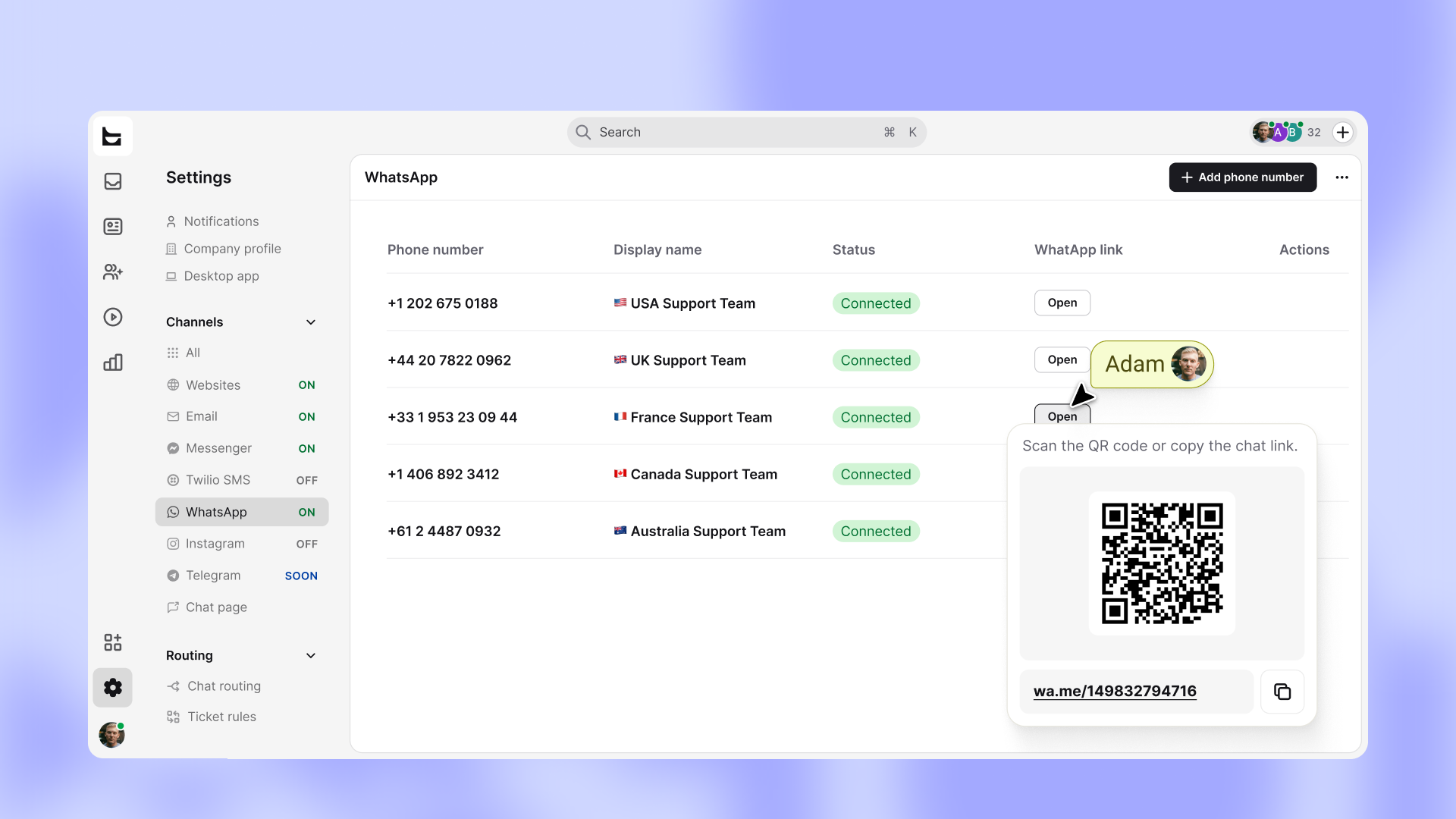 Connect WhatsApp to Text in minutes
WhatsApp is already on every Text license. Open settings, connect your number, and start handling WhatsApp in the same inbox as the rest of your support.
How Text compares to other customer service platforms
If you're evaluating Text against the customer service platforms you'd actually shortlist alongside it, here's how WhatsApp coverage looks across them.
Platform | WhatsApp model | AI on WhatsApp | What it costs to add WhatsApp | Notes for support teams |
Text | Native channel in the inbox, same place as web chat | Same AI Agent as web chat, trained on the same knowledge | Included on every Text license (plans from $19/month per user), no per-number fee. AI Agent has per-resolution costs | Already on every paid, trial, and new license. Setup in minutes |
Zendesk | Native channel in Zendesk messaging | Zendesk AI Agent, configurable to run on WhatsApp | Suite plan from $55/agent/month, Advanced AI add-on ~$50/agent/month, plus per-resolution fee for AI Agent | Mature, layered pricing. WhatsApp itself adds no extra channel fee on top of Suite |
Intercom | Native channel, available across all Intercom plans | Fin AI Agent works on WhatsApp like other channels | Seats $29–$139/agent/month, plus WhatsApp channel usage fees, plus $0.99 per Fin resolution | Per-resolution AI pricing can scale unpredictably with volume |
Freshdesk | Available in Freshdesk Omni or Freshchat, not classic Freshdesk | Freddy AI Agent, billed per session. | Omni from $29/agent/month (Growth); AI sessions sold separately | Multichannel sits in Omni or Freshchat, not the base Freshdesk product. Plan accordingly |
HubSpot Service Hub | WhatsApp via the Channels integration | Breeze AI Agent on higher tiers | Service Hub Professional from $90/seat/month, with AI features tier-gated | Most natural if HubSpot CRM is already the source of truth |
What this means in practice.
Most customer service platforms now offer WhatsApp natively. Per-resolution AI pricing is the norm across the category – Text, Intercom, Zendesk, and Freshdesk all charge per AI resolution in some form. Budget for that volume the same way you'd budget for any usage-based cost.
Where the differences show up is in what you pay to add WhatsApp as a channel on top of your existing setup. In Text, it's included on every license with no per-number fee. In Zendesk and Intercom, the helpdesk seat covers it on most plans. In Freshdesk, you'll need Omni or Freshchat to get it at all.
FAQ
Can you use WhatsApp for customer support?
Yes. WhatsApp Business Platform is built for exactly that. Your team can run a shared inbox, route conversations, automate replies with an AI Agent, and connect WhatsApp to the rest of your support stack. The smaller WhatsApp Business mobile app works for one- or two-person operations but caps out quickly.
Is WhatsApp Business free for customer support?
The WhatsApp Business mobile app is free, but it's limited to small teams. WhatsApp Business Platform (the version support teams actually use) involves Meta's per-message pricing on top of whatever your support software costs. Meta switched from per-conversation to per-message billing on July 1, 2025 and separately made customer-initiated service conversations free back in November 2024. Inside Text, connecting WhatsApp itself doesn't add a per-number fee, and service replies within the 24-hour window from a customer-initiated conversation are free at the Meta layer.
WhatsApp Business app or WhatsApp Business Platform: which do I need?
If your team is more than two or three people, or if you want AI automation, routing, or proper analytics, you need WhatsApp Business Platform. The mobile app is fine for very small operations but doesn't scale beyond that.
How do I automate WhatsApp support?
Connect WhatsApp to a platform that has a real AI Agent, and let that agent handle the first response. A well-trained AI Agent resolves common questions instantly, takes action on things like order lookups and refunds, and escalates the rest to a human with full conversation context attached. For the deeper version of this story, see our guide on chatbots in customer service automation.
How do I connect WhatsApp to my help desk or live chat?
Inside Text, you go to Settings → WhatsApp, click Continue with Facebook, and run through the Meta setup wizard. The whole flow takes a few minutes if your Meta Business Portfolio is in order. From that point on, WhatsApp conversations land in the same inbox as web chat, handled by the same team and the same AI Agent.
Start running WhatsApp the way the rest of your support already runs.
WhatsApp is already a channel in Text, on every license. Connect your number from settings and bring the conversations your customers are already having into the inbox your team already uses.