
Tomasz Ziętek
Content Creator
Experienced content and SEO specialist working with SaaS businesses since 2016. After hours, he's cycling, cooking, traveling, or digging through record crates.
For four days my parcel sat in the same city. The tracking page said "in transit" every time I opened it, which by about the sixth refresh had stopped reading as information. On the fifth morning I gave up and opened the store's chat to ask a human where my order was. For most WooCommerce stores that question is the biggest category in the queue — support vendors put WISMO at 30–50% of inbound volume in a typical DTC store, climbing past half in peak season.
Almost none of those tickets need a human. The tracking information exists and the shipping carrier has scanned the package. It just isn't anywhere the customer can reach it, so they ask you.
And this is the part worth arguing with your fulfillment team about: speed is no longer what shoppers care about most. McKinsey's 2024 US consumer delivery survey found delivery speed had fallen from the top priority in 2022 to fifth, behind cost, shipping transparency, returns flexibility and choice of delivery location — with 90% of shoppers willing to wait two or three days to avoid a shipping fee. Transparency now outranks speed, which is convenient, because transparency is the one you can fix this week.
Two jobs get filed under WooCommerce order tracking. One is reporting where a package is; the other is telling a customer what to do about that. A plugin handles the first well. The second is still landing in your inbox.
What WooCommerce order tracking gives you out of the box
More than people assume, and less than you need.
Core statuses. A default install ships with these WooCommerce order statuses: Pending payment, Processing, On hold, Completed, Cancelled, Refunded, Failed. There's no "Shipped" and no "Out for delivery," so an order that left your warehouse three days ago and one that arrived this morning both sit in Processing.
You can close that gap with custom order statuses. The following code snippet registers a Shipped status:
add_action( 'init', function() {
    register_post_status( 'wc-shipped', array(
        'label'                     => 'Shipped',
        'public'                    => true,
        'show_in_admin_status_list' => true,
        'label_count'               => _n_noop( 'Shipped (%s)', 'Shipped (%s)' ),
    ) );
} );

add_filter( 'wc_order_statuses', function( $statuses ) {
    $statuses['wc-shipped'] = 'Shipped';
    return $statuses;
} );
Both halves are required. register_post_status() creates it, the filter puts it in the dropdown, and the slug has to start with wc- or WooCommerce won't recognize it.
That code snippet gets you a status your team can filter by. It doesn't get you carrier data — the shipping status still changes only when a human changes it.
The native order tracking form. WooCommerce also includes an order tracking form you can publish without an extension. Create a page in your WordPress dashboard, call it "Track your order," and paste in [woocommerce_order_tracking]. Customers enter their order ID and billing email and see current status. It's useful and almost nobody switches it on — link it from your footer and order emails so customers track orders without opening a ticket.
The catch: the form reports your WooCommerce order status. The carrier's status never reaches it, so a customer whose parcel is stuck in a depot sees "Processing" and learns nothing.
What isn't there. WooCommerce does not natively include carrier tracking fields — no tracking number field, no carrier dropdown, no tracking URL generation, no shipment tracking in the customer's account. Tracking information requires a shipment tracking extension or integration. That's not a criticism, just the shape of the platform.
Why it matters
For customers, the post-purchase window is the one stretch where you've taken the money and delivered nothing. What they want is narrower than "tracking": an estimated delivery date they can plan around, a warning when it slips, and one place to look. A delay you tell them about is an inconvenience. A delay they find themselves is a broken promise.
For your online store, three things follow. WISMO is the cheapest deflection available — high volume, one right answer, and it lives in a database. Missed delivery windows drive refunds, chargebacks and one-star reviews about shipping on products that were fine. And an order tracking page is a page customers open voluntarily, several times, with intent. Keeping it on your domain turns a delivery update into a return visit, and giving customers visibility they didn't ask for is a cheap way to build trust.
Layer 1: get tracking information into WooCommerce
Nothing in your shipping tracking setup works until every fulfilled order carries a number and a carrier in a real field.
WooCommerce's own Shipment and Order Tracking extension is the reference implementation. It adds a meta box where you click Add Tracking, fill the tracking number field, pick a shipping carrier, optionally set a shipping date, and hit Save. It's seconds per order. If you buy labels through WooCommerce Shipping, the tracking number is generated and saved to the order automatically, so this mostly takes care of itself.
Its carrier list covers DHL, FedEx, UPS and Aramex worldwide, plus regional providers — USPS and Amazon Logistics in the US, Royal Mail and Evri in the UK, Canada Post, and others across Europe and Australia.
If yours isn't listed, build a custom carrier under WooCommerce → Settings → Shipment Tracking → General. Enter a display name and a tracking URL with %s as the placeholder:
https://example-carrier.com/track/%s
Save it and it behaves like any default carrier in the dropdown.
Once you save tracking, that order tracking information appears in three places customers already look: order emails, the orders table on their account page, and the individual order details page. The extension also exposes tracking through the WooCommerce REST API, so you can add tracking numbers programmatically from a 3PL or WMS instead of typing them by hand.
Alternatives worth comparing. YITH WooCommerce Order & Shipment Tracking lets you enter a tracking code, carrier and pickup date on the order details page for free. 480+ carriers, tracking in emails and CSV import are premium version features, and the free tier sets only one default carrier. Orders Tracking for WooCommerce covers 80+ carriers plus custom ones, and its free build exports orders straight to a CSV file for you to add tracking numbers and import back — bulk import isn't paywalled. It also pushes shipping information to PayPal Standard and Express Checkout transactions, which helps on disputes. Advanced Shipment Tracking is the usual pick if you plan to add TrackShip on top.
Most of these plugins let you tune the customer-facing side too: customize the subject and heading of tracking emails, choose whether tracking data sits before or after the product list, and send email notifications automatically when you add tracking numbers.
Bulk import is the deciding feature for most teams. Past a few dozen orders a day, adding tracking one order at a time is a job nobody should have.
Check before you install:
High Performance Order Storage: HPOS moves orders into dedicated order tables. Confirm the plugin declares compatibility or you'll hit odd behavior on the order screen.
The changelog: Are recent releases new features, or a long tail of bug fixes?
Overlap with other plugins: If something already generates PDF invoices and packing slips, check whether it also writes shipping information — you don't want two plugins fighting over the same order emails.
The one-star reviews: Two minutes on the reviews tab beats the feature list.
Layer 2: automate shipping status with TrackShip
Layer 1 stores a number. It doesn't know where the package is.
TrackShip for WooCommerce does the part you shouldn't build yourself: 1,000+ carriers by TrackShip's own count, shipment data fetched every few hours, normalized statuses, a branded order tracking page on your store, and email notifications on status change.
One dependency: TrackShip doesn't capture tracking numbers itself. It requires a WooCommerce shipment tracking plugin underneath — Advanced Shipment Tracking, WooCommerce Shipment Tracking, or YITH. Layer 1 first, always.
Set up the branded tracking page styled to match your store, status notifications for in transit, out for delivery, delivered and (most valuable) exception or delayed, plus admin alerts so your team sees a stuck shipment before the customer does. An email saying "Your order shipped with Canada Post" with a live link keeps customers informed without a ticket.
TrackShip runs a 15-day free trial covering 100 shipments, then plans that scale with volume.
The layer most stores are missing
Most WooCommerce order tracking advice stops there. And you will still get WISMO tickets, because an order tracking page answers one question — where is the package right now? — and customers arrive with the questions next to it:
"It says delivered and it isn't here."
"Can I change the delivery address?"
"Two of three items arrived. Where's the third?"
"It's been in the same city four days. Is it lost?"
"I never got the tracking email, can you resend it?"
None are answerable by a status timeline. They need the tracking info plus the order record plus your policy plus a conversation.
That store's tracking page could tell me my package was in that city. It had no idea whether four days there was normal for the carrier or a parcel nobody could find, which was the only thing I actually wanted to know.
Layer 3: chat and AI on top, with Text
Text is an AI chatbot, live chat and help desk plugin for WordPress that handles that conversation. Full disclosure: it's our product. The tracking layer above belongs to TrackShip and we're not trying to replace it.
Native WooCommerce connectivity — agents and the AI see order details and cart contents in the conversation instead of alt-tabbing to the WordPress dashboard.
An AI Agent trained on your content — point it at your shipping policy, delivery windows and tracking page and it answers routine WISMO 24/7, including at 11pm when people check on packages.
Warm handoff with context — lost parcel or refund moves to a human with full history, and your agent can close previous tickets from the same customer instead of running three threads about one parcel.
Copilot — reply suggestions and knowledge base lookups while your agent types.
Proactive campaigns — someone hitting the tracking page a third time in two days is worth reaching before they open a ticket.
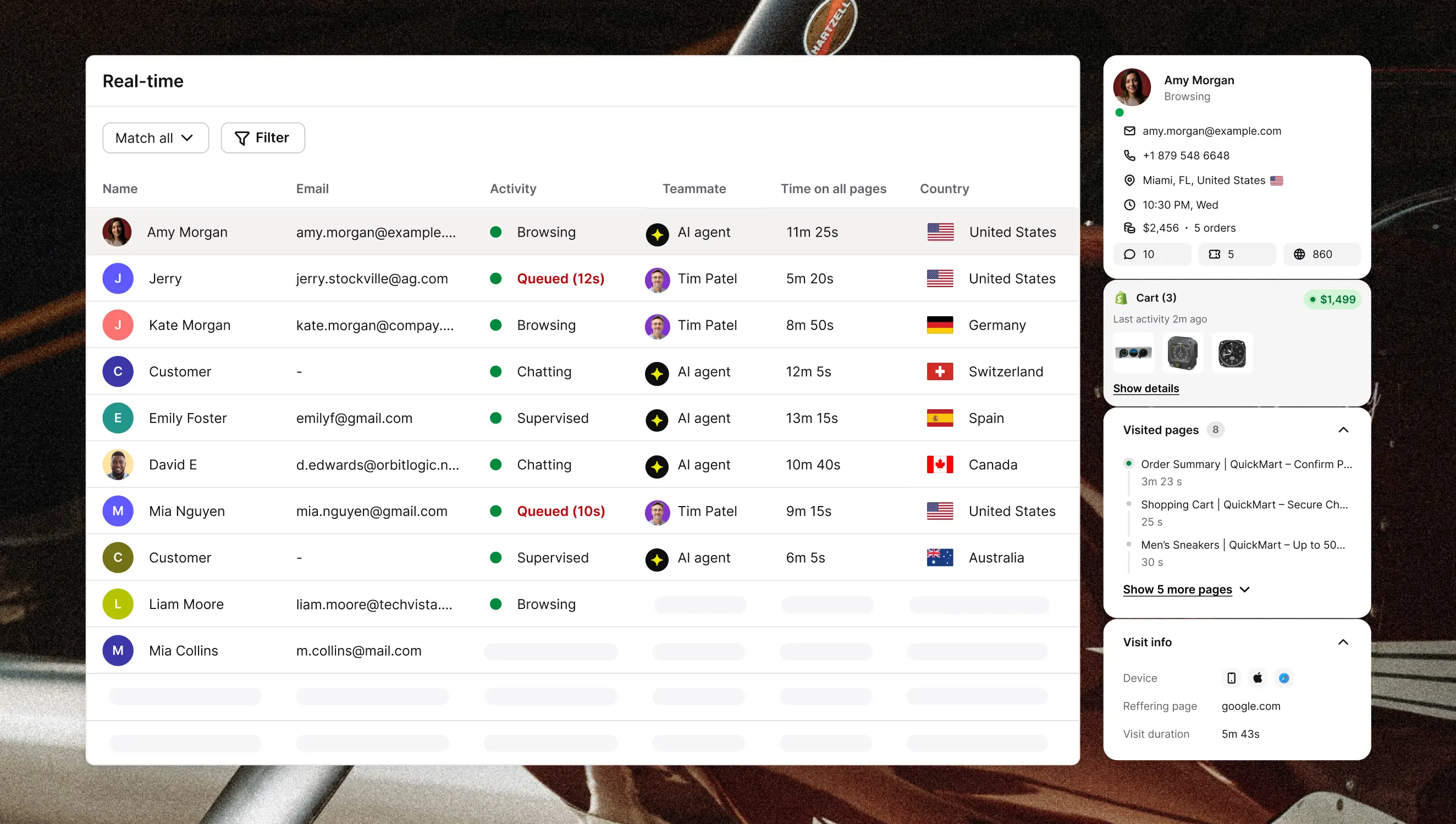 WordPress 6.0+ and PHP 7.4+, 14-day trial, plans from $19/month. Check current AI resolution limits before budgeting — resolutions are the meter that moves, and they climb faster than your seat count does.
Who shouldn't bother: under ~50 orders a month, Layers 1 and 2 plus a well-linked order tracking form handle nearly all of it.
Setting it up
Install the plugin. In your WordPress dashboard go to Plugins → Add Plugin, search AI Chatbot by Text, then Install Now and Activate. Alternatively, start in the Text dashboard under Settings → Website widgets, enter your site URL, select WordPress, and click Add to WordPress.
Connect it. Open the Text tab in your sidebar, click Connect Text, log in or sign up. No API keys. Confirm under Settings → Website widgets, then load your storefront in a private window. With WooCommerce installed, ecommerce features activate automatically.
Feed the AI Agent your shipping knowledge. This decides whether the whole thing works, and it's the step people rush. Give it your dispatch cutoffs and delivery estimates per method and region, the URL of your TrackShip page and your tracking form, your "delivered but missing" procedure, address-change cutoffs, and split-shipment behavior. Write plain answers: "Standard UK delivery is 3–5 working days from dispatch, next-working-day dispatch before 2pm" is usable. "Please allow adequate time for processing" is not.
Decide the handoff. The AI owns status lookups, delivery date estimates, tracking link resends and policy questions. A human takes lost parcels, damage claims, address changes after dispatch, and anything involving money. Then test it — open the widget on your own store, ask "where's my order," push toward a lost package, and watch what your agent receives.
Watch the reports. Text's ecommerce reports show orders, order value and average time from chat to purchase, split all-sales and AI Agent-only. Read the attribution honestly: it's our own reporting, and it counts sales during a chat or within 30 days after one, so it will credit chat with purchases chat didn't cause.
What to measure
Take a baseline before you switch anything on — a spreadsheet with two columns, before and after, is enough.
Metric | Source | Good looks like |
|---|---|---|
WISMO share of tickets | Help desk, tagged | Falling — the headline number |
AI resolution rate | Text | Rising as content improves |
Tracking page visits | TrackShip | Rising; notifications are landing |
Delivery exception rate | TrackShip | Flat; spikes point at a carrier |
First response time | Text | Falling on what still escalates |
If WISMO drops but AI resolution rate is also low, customers are giving up rather than getting answers — read the transcripts. If exceptions climb on one carrier, no automation fixes it. That's a fulfillment conversation.
Where to start
Publish the native order tracking form and link it from your footer and order emails
Install a shipment tracking plugin so every order gets a real tracking number field
Add TrackShip so shipping status updates and notifications happen without you
Put Text on top so the questions a tracking page can't answer get handled in chat
My parcel turned up on day six. A tracking plugin would have spared that store most of my questions — the chat layer is what it needed for the one I asked anyway, and for the four days of silence that made me ask it.
Keep learning
- Customer Service
Customer experience metrics: five stars and a cancellation
13 min read - Customer Service
AI in customer service: what it automates, breaks, and what customers actually want in 2026
19 min read - Customer Service
Text vs Gorgias: why e-commerce brands see the bill rise with automation
18 min read