
Sylwia Kocur
Content Marketing Specialist
I joined Text to help introduce our products to companies looking for a reliable and forward-thinking partner in global communication. With experience as both a Product Expert and now a Content Writer, I understand what businesses need and help them discover how Text can support their goals.
Every support team has the same two people. A junior agent who needs a little help sounding like an expert. And a manager who'd rather not spend another weekend stitching together tools that don't talk to each other.
That's the gap customer service automation software is supposed to close. Most tools promise it. Text is built to actually do it, and that difference is exactly what you're selling.
This is a partner-focused walkthrough of the automation and productivity side of Text: what it does, how it works day to day, and where the money is for you. Think of it as the expanded version of the update you'd get from your Text account manager, with the extra context you need to turn it into a pitch.
Let's get into the parts your clients will actually ask you about.
What counts as customer service automation software anyway
It's worth pausing here because clients throw the phrase around loosely, and you'll sound more credible if you can define it cleanly in a sales conversation.
Customer service automation software is any tool that reduces or removes manual, repetitive work from customer support, without removing the human judgment that complex issues still need. That covers a wide range of things: automated ticket routing, AI agents answering common questions, self-service knowledge bases, sentiment analysis flagging frustrated customers before they escalate, and workflow automation triggering actions based on events.
It also helps to separate two ideas clients often blur together: automation and AI:
Automation is rules-based. If this happens, do that.
AI agents are different. They interpret intent, hold context across a conversation, and can handle open-ended customer queries that a fixed rule never anticipated.
The best customer service automation setups use both together, letting rules handle the predictable and AI handle the ambiguous.
Why customer service automation software is suddenly a partner conversation
Support teams are being asked to do more with the same headcount, and that pressure isn't easing up. Gartner predicts that by 2029, agentic AI will autonomously resolve 80% of common customer service issues without a human ever stepping in, cutting operational costs by roughly 30% along the way.
That's the shift your clients are already sensing, even if they can't name it yet. They see support tickets climbing, agents burning out on routine tasks, and competitors quietly getting faster while their own customer service operations still run on spreadsheets, sticky notes, and whichever desk software happened to get bought first.
The AI customer service market itself reflects that urgency. It's projected to hit $15.12 billion in 2026 and grow at a 25.8% compound annual rate through the rest of the decade. That's not a niche upgrade anymore. It's the direction the entire category is moving, and it's why "we'll get to it eventually" is quietly becoming a competitive risk for the businesses you sell into.
This is also why sentiment analysis and natural language processing keep coming up in conversations about the best customer service automation on the market. Customers don't always say "I'm frustrated" outright, but the tone of a message usually gives it away. Tools that catch that shift early, before a complaint becomes a churn risk, are doing something a basic keyword-matching bot never could.
Here's the part worth repeating to every client who thinks AI customer service software is a "nice to have": everyone has AI now. Sell and promote AI that actually does something. The tools that win aren't the ones with the longest feature list. They're the ones that remove real, daily friction from a support team's workflow, and that's exactly what this module is built to do.
One workspace where agents finally see the whole picture
Support teams don't fail because agents are careless. They fail because information lives in five different places, and nobody has time to check all five before responding.
Text solves that by pulling chats, tickets, and messages from every channel into a single view. Agents open one screen and see the complete conversation history, regardless of where the customer first reached out. No more asking a customer to repeat themselves because the email thread didn't sync with the chat log.
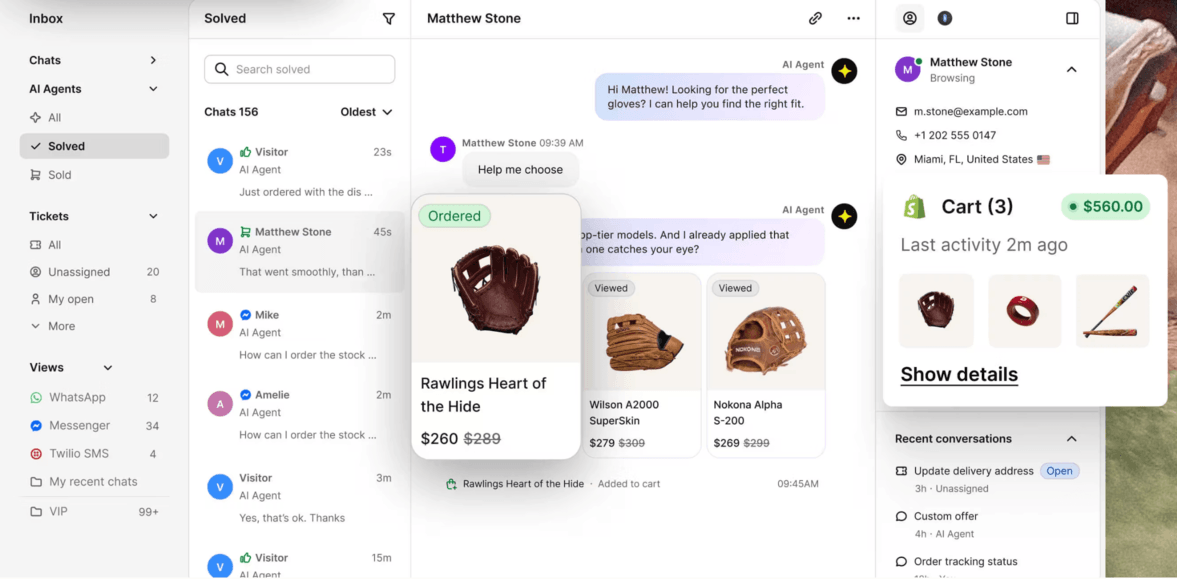
For growing support teams, this matters more than it sounds like it should. A support agent handling twenty conversations a day loses real time hunting for context in separate systems. Multiply that across a team, and you're looking at hours of lost productivity every single week, hours that show up nowhere on a spreadsheet until a client actually measures it.
This is also where smart routing earns its keep. Incoming customer inquiries get automatically directed to the agent or team best equipped to handle them, based on topic, urgency, or customer history. Support operations stop relying on someone manually eyeballing every new ticket and guessing where it belongs.
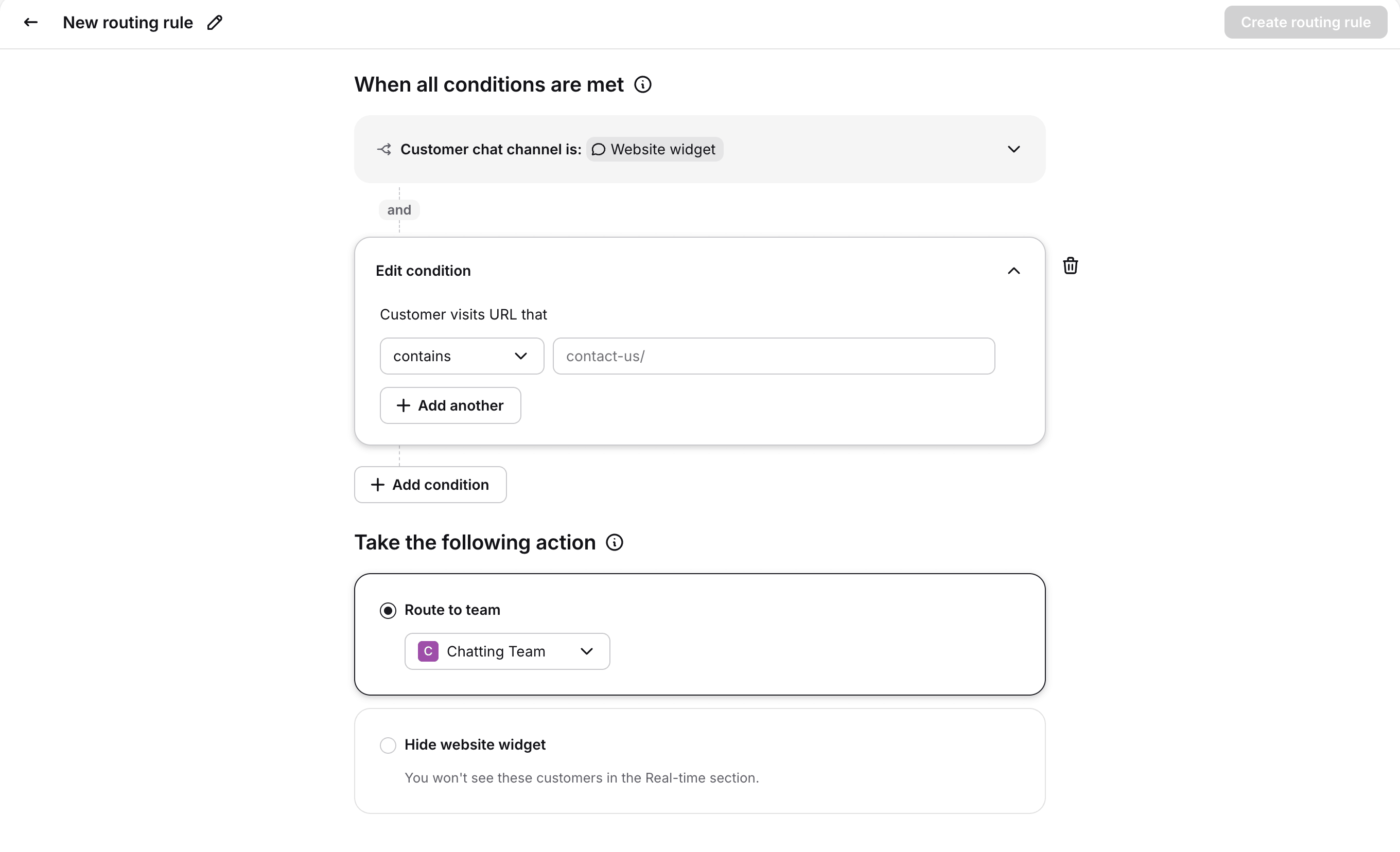
Ticket management benefits the same way. Instead of a queue that treats every request as equally urgent, priority gets assigned automatically based on rules the client defines. A billing dispute from a high-value account doesn't sit behind a routine password reset just because it arrived five minutes later.
The result is a support tool that behaves less like a ticket queue and more like a command center. Agents open fewer tabs. Managers stop fielding "where did that conversation go" questions. And customers get answers faster because nobody's piecing together their history from scratch.
Customer profiles turn every chat into a sales lead
Picture a returning customer who messages in about a shipping delay. Without context, an agent treats it as a routine complaint: apologize, check the tracking number, move on. With Text's customer profiles, that same agent sees the customer's full order history, their average spend, and the fact that they've asked about a specific product line twice this month.
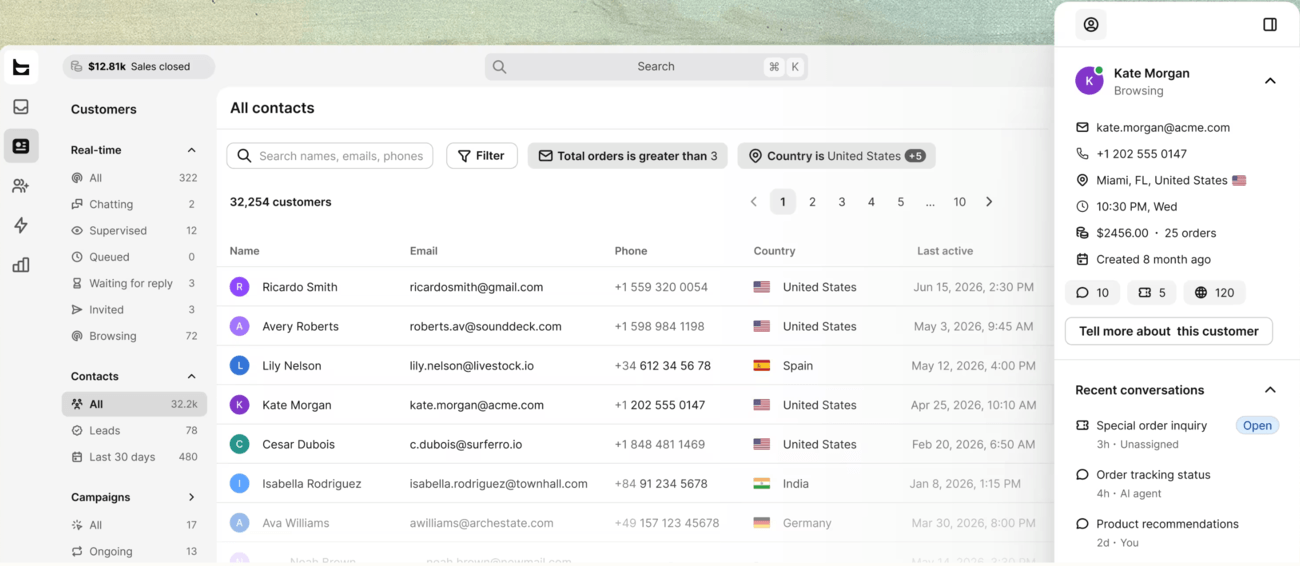
That agent now has options the first version of the conversation didn't offer. Maybe the shipping issue is worth a small gesture. Maybe the repeated product interest is worth a mention of a related item. The conversation stays the same length, but the outcome changes completely.
That's the actual value of bringing customer data, purchase history, order data, and behavior into one card. It's not just about resolving the shipping question faster, though it does that too. It's about giving agents the context to turn ordinary customer interactions into moments that build loyalty or drive a sale.
Here's a second scenario worth using in a pitch. A prospect browses a pricing page three times in a week without ever starting a chat. The next time they do reach out, even about something unrelated, the agent can see that browsing pattern sitting right in the customer profile. That's a warm lead most support tools would let walk straight past the team without anyone noticing.
This matters even more for small businesses and lean support teams who can't staff a dedicated sales function. Every support conversation becomes a chance to surface value, because the agent already has everything they need without asking the customer a single extra question.
For your pitch, this is the feature that reframes support as something other than a cost center. A client who sees their help desk as a place where things get resolved will nod along politely. A client who sees it as a place where customer history creates upsell and retention opportunities will lean forward.
AI support that makes a first-week agent sound like a five-year veteran
Every support manager has lived through this: a promising new hire joins, gets a week of training, and then freezes the first time a customer asks something slightly outside the script. It's not a skills problem. It's a confidence and context problem, and it's exactly what Copilot is built to solve.
What Copilot actually does day to day:
Delivers real-time reply suggestions while an agent is mid-conversation, so they're never staring at a blank text box.
Fixes tone automatically, catching replies that read as curt or overly formal before they go out.
Summarizes long threads instantly, so any agent picking up a conversation mid-stream can catch up in seconds instead of scrolling through twenty messages.
Detects the customer's language automatically and suggests tags, routing, and categorizing conversations without a human doing it manually.
None of this replaces human agents. It removes the busywork sitting between them and a good answer. A first-week hire responds with the same clarity as someone three years into the role, because the tool is quietly doing the tone-checking and context-gathering that experience usually provides.
There's a natural language processing layer underneath all of this that's worth explaining plainly to a technical client. Instead of matching keywords, the system interprets what a customer actually means, which is why it can summarize a rambling thread accurately or detect frustration in a message that never uses an angry word. That kind of sentiment awareness lets a workflow flag an at-risk conversation for a manager before the customer asks to speak to one.
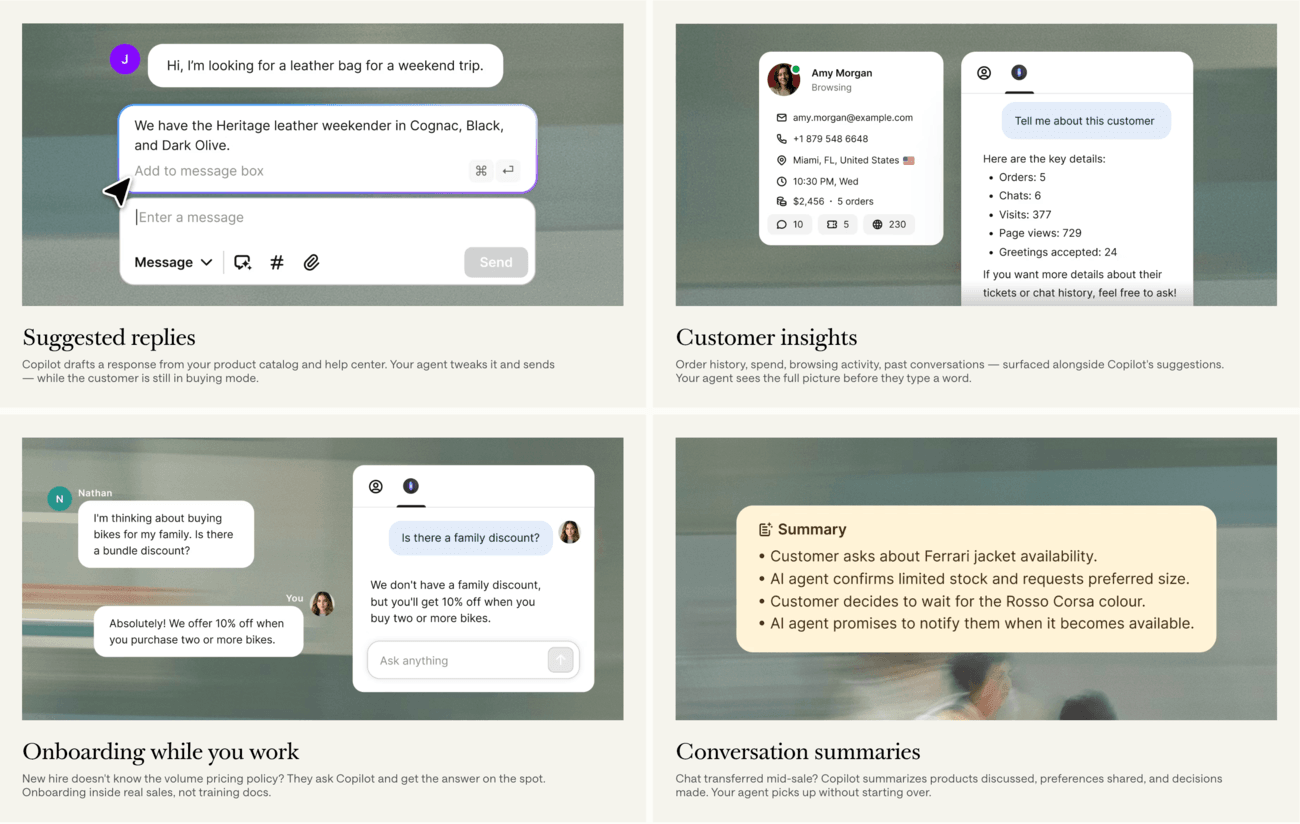
For agent performance metrics, this shows up fast. Faster first response times. Fewer escalations for things that didn't actually need escalating. Higher customer satisfaction, because customers get consistent, well-written answers regardless of who's handling the ticket that day.
It's worth being direct with clients about what this isn't. It's not a chatbot replacing their team. It's a tool that makes every human agent they already have better at the job on day one. That distinction tends to matter to support managers who've been burned by automation pitches that quietly meant "we're replacing your headcount."
Where self-service and AI agents fit into the same picture
Not every customer wants to talk to an agent at all, and a good automation pitch accounts for that, too. A self-service portal built on a knowledge base handles the simplest, most repetitive customer queries: password resets, order status, return policies, the questions that make up a huge share of daily support tickets without needing any judgment at all.
AI agents sit a step above that. They can hold a real conversation, pull live account information, and resolve multi-step requests, all before a human agent ever sees the ticket. On Text's own support operation, AI Agent resolves 74% of chats without human involvement, a clear number that is evidence the platform's own advanced features hold up under its own support volume, not just in client deployments.
For a client evaluating a customer service tool, that layered approach matters. Self-service knowledge bases catch the simplest inquiries. AI agents catch the ones that need a bit more reasoning. Human agents, backed by Copilot, handle everything that's left, which by definition is the smaller, more complex slice of total ticket volume. That's how a support team scales without a one-to-one increase in headcount every time customer inquiries grow.
It's worth clarifying the difference between AI tools and AI agents when a client asks, because the two get used interchangeably and shouldn't be. An AI tool typically assists a human, drafting a reply or summarizing a thread for someone else to send. An AI agent acts more independently, capable of resolving a request from start to finish within the permissions a client defines. Text uses both, and knowing which capability solves which problem is what separates a partner who understands the platform from one who's just reciting a brochure.
Automation that runs the operation without a babysitter
Here's a case study that shows this in action. Fuse needed to keep resolution times down as ticket volume grew, without adding headcount to the support team just to keep pace. Using Text's automation and workflow features, they cut resolution time by 63%, with the same team size they started with. It's what happens when routine triage, routing, and follow-ups stop depending on a person doing them by hand.

That's what a no-code workflow builder makes possible. A workflow triggers actions based on events: a new chat starting, an SLA at risk of being breached, an order status changing. No engineering required. That single capability powers VIP flagging, automated follow-ups, and escalation routing that used to demand a manager watching every queue in real time.
Automated workflows like these remove the manual triage that eats a manager's day. Instead of someone deciding which tickets are urgent, the routine tasks get handled automatically: a bad chat rating triggers a follow-up ticket, an at-risk SLA escalates before it breaches, a VIP customer's message jumps the queue without anyone flagging it by hand.
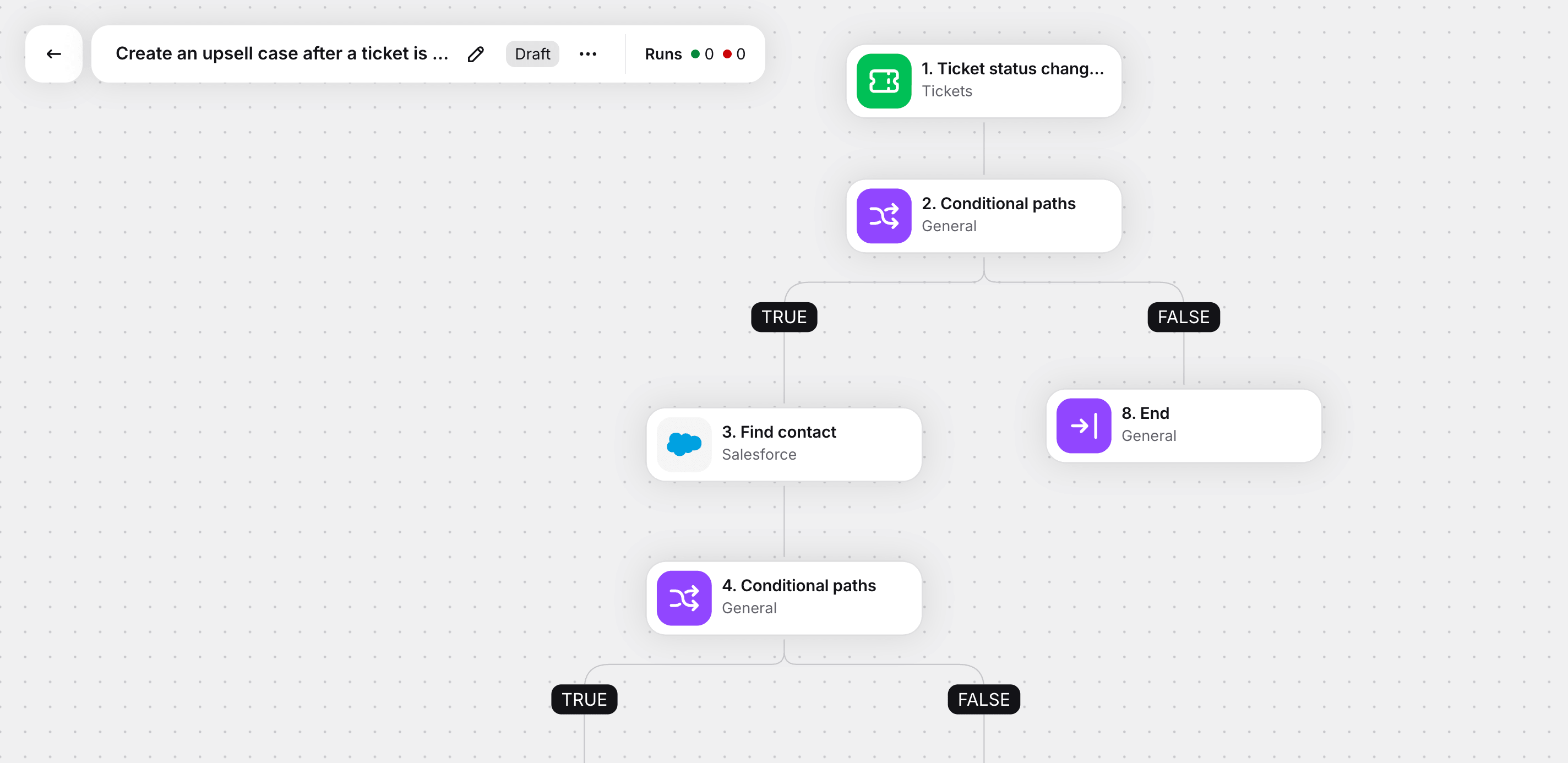
The business case here is straightforward. Support operations that used to need a manager babysitting every step now run on rules that don't take days off. Human intervention gets reserved for the complex issues that actually need it, not the routine ones that a rule could have caught.
Webhooks connect Text to whatever else your client runs
No client's tech stack looks exactly like the one in a product demo. There's a CRM here, an internal ticketing tool there, a Slack channel everyone actually reads. Webhooks are how Text plugs into that reality, rather than asking the client to work around it.
A webhook fires the moment something happens inside Text: a chat starts, a ticket gets created, an order status updates. From there, it can trigger a discount code, update a CRM record, or fire a Slack alert to the right person, all without a human relaying the information by hand.
GetResponse, an email marketing platform serving 350,000+ customers, built exactly this kind of custom integration to feed chat transcripts into their internal support system. Marcin Łańcucki at GetResponse said it let the team "analyze the quality of the interaction and build and modify detailed statistics to match our current needs," and the measurable payoff was lower churn and stronger retention.
A few other integration patterns worth having ready for client conversations:
A legacy database with no modern API can still be bridged, using a lightweight service that reads the old data, reshapes it, and pushes it to Text in real time.
Reporting and analytics layers can pull chat volume, response times, and CSAT data out of Text and into whatever business intelligence tool a client already trusts.
Ticket routing logic can go far beyond a simple rule, applying multiple business variables at once, like client tier and contract value, to decide where a ticket lands.
That's the pitch for third party tools and integrations done right. You're not selling a license and walking away. You're selling the entire integration into a client's existing ecosystem, which is a harder thing to replace and a much easier thing to keep billing for.
How this maps to the actual customer journey
It helps to walk a client through where automation sits across an actual customer journey, rather than treating each feature as a standalone item on a list. Most support tools describe themselves in pieces: here's the inbox, here's the bot, here's the reporting. Text is easier to sell when you describe it as a single flow instead.
The visitor arrives. Before a single message is sent, Text is already tracking behavior: which pages someone views, how long they linger, where they hesitate. That activity feeds directly into the customer profile, so by the time a conversation starts, there's already a customer history sitting behind it.
The conversation starts. This is where instant answers matter. A customer typing in a question at 11pm doesn't want to wait for business hours. AI agents and automated routing mean a customer query gets a response immediately, whether that's a fully AI-resolved answer or a fast handoff to the right human agent.
The conversation gets personalized. Because the agent, or the AI agent, already has the customer's order data and behavior in view, the reply isn't generic. It's personalized support built on what the system already knows, not what the customer has to explain from scratch.
The outcome gets captured. Whether that's a resolved support ticket, a recovered sale, or a flagged VIP conversation, the workflow builder and webhooks make sure the outcome actually goes somewhere: a CRM gets updated, a Slack channel gets pinged, a follow-up gets scheduled.
Framed this way, automation features stop looking like isolated tools bolted onto a help desk. They look like a single operation, and that's a much easier thing to sell as a complete package instead of a checklist of individual automation tools.
A partner's implementation checklist for getting the initial setup right
Since this is meant to work as a working reference and not just a pitch outline, here's a practical order of operations for the initial setup, the kind of thing you can walk through on a discovery call.
Map the client's existing channels
Before touching a single workflow, get a clear list of every channel customers actually use today, whether that's chat, email, or social. Text's unified inbox only pays off if every channel that matters is actually connected to it.
Define the routing logic before building it
Ask the client how tickets get assigned today, even if the honest answer is "whoever notices first." That current, messy process is the baseline you're improving on, and it tells you what rules the smart routing setup actually needs.
Start automation with the highest-volume repetitive task, not the most impressive one
A workflow that automatically tags and routes the most common customer inquiry type will save more hours in week one than a clever but rarely-triggered VIP escalation flow.
Connect the customer profile fields that actually matter to that specific business
An ecommerce client cares about order history and cart activity. A SaaS client cares about the plan tier and renewal date. Don't import every possible field; import the ones that change how an agent responds.
Layer in webhooks only after the core workspace is stable
Clients get the most value from integrations once their team already trusts the day-to-day workflow. Introducing a CRM sync or Slack alert too early, before the basics are bedded in, tends to create noise instead of clarity.
Review automation performance after the first few weeks, not just at kickoff
Automated workflows need occasional tuning as ticket volume and customer requests shift, and that review is exactly the kind of ongoing, billable touchpoint that turns a one-time implementation into a maintained account.
What the results actually look like
Clients don't buy automation because the demo looked slick. They buy it because someone else already proved it works, and the numbers back that up.
What clients see | The result |
|---|---|
First response time | 96% reduction after switching to Text |
Customer satisfaction | 98% CSAT reported by Text users |
Team workload | Automation and AI reduce workloads by up to 18% |
Wembley Stadium | $1.5M in added revenue in 8 months, a 2335% ROI |
Funded Trading Plus | 93% CSAT maintained through a 15x traffic surge |
Fuse | 63% faster resolution with the same team size |
Scale matters here too. In 2024, Text managed 2.1 billion customer interactions and resolved more than 230 million chats through AI chatbots, on a platform already trusted by 35,000-plus businesses across 150 countries. It's evidence at a scale most competing tools simply can't point to.
When you're pitching, lead with whichever number matches the client's actual pain. A client drowning in support tickets cares about the 18% workload reduction. A client trying to justify the spend to their own leadership cares about Wembley's ROI. A client worried about a seasonal traffic spike cares about Funded Trading Plus holding a 93% CSAT through a 15 times surge. Same product, different door in.
How you actually earn from this module
There are two separate ways this becomes revenue for you, and they're not mutually exclusive.
Implementation services. Clients rarely want to configure workflow triggers, connect webhooks, and set up customer profile fields themselves. That's billable work, and it's work that continues past the initial setup, since rules change, integrations need maintenance, and new automations get requested as the client's business grows.
Initial setup is usually where the biggest single invoice lives, but the ongoing tuning, new workflow requests, and integration maintenance are where the relationship turns recurring.Building your own solutions on Text and monetizing them directly. If you're technical, custom API integrations, like the legacy system bridges and reporting layers described above, can become one-time build fees plus ongoing maintenance retainers. That turns a single client engagement into a predictable, recurring line of income instead of a one-off invoice.
Both paths run through the Text Partner Program, which gives Solution partners full access to the platform's APIs and SDKs at no additional cost, a partner console for managing client licenses, and tiered revenue share that increases as your book of business grows. You're not paying per API call or per seat to build any of this, which keeps your own margins predictable while you scale, and it means the more ARR you bring under management, the better your own revenue share becomes.
Custom integrations. They stay private to the client relationship, and that's a genuine advantage worth pointing out to clients weighing whether custom work is worth the time: you're not commoditizing your build by handing it to a marketplace where competitors can copy it. The integration becomes part of why that client stays with you specifically.
The Partner Program also rewards growth rather than staying flat. As the annual recurring revenue you manage across clients increases, you move up through tiers, and each tier unlocks a higher revenue share along with things like co-marketing opportunities and, at the top tier, a dedicated account manager.
In practice, that means the second and third client you bring onto automation and the help desk module are worth more to you than the first one was, simply because your existing book of business has already moved you into a better tier. It's a rare structure where taking on more clients directly improves the margin on the ones you already have.
Which industries ask for this first
Not every client walks in the door already convinced. But a few kinds of businesses tend to feel this pain earlier and harder than everyone else, and it's worth knowing who they are before you're sitting across from one.
Industry | Where the pain shows up | What resonates in the pitch |
|---|---|---|
Ecommerce | Flash sales and holiday surges turn customer service teams into an overnight bottleneck | Automated routing, smart escalation, and customer profiles tied to order data, all paying for themselves in a single weekend |
SaaS | Support tickets run more technical, and a returning customer's plan tier or renewal date matters as much as order history would for a retailer | Ticket summaries and routing rules built on multiple account variables at once |
Financial services and iGaming | Regulated, high-trust environments need consistent, compliant responses at scale, with a full audit trail of every conversation | Automation that runs the same way every time, without a tired agent improvising |
Small and growing businesses | The founder has outgrown answering every message personally, and the team hasn't caught up yet | Fast, low-effort setup where the pain is immediate and the fix is obvious the moment they see the workspace in action |
Knowing which of these a prospect resembles before the call changes which proof point you lead with, and it's the difference between a generic product tour and a pitch that sounds like it was built for them specifically.
Measuring what matters, so the value doesn't stay invisible
A client who can't see the improvement will eventually stop valuing it, no matter how real it is. That's why reporting matters as much as the automation itself, and it's worth building into every implementation from day one rather than bolting it on later when a client asks "so did this actually help?"
Text's reporting sits on top of the same data these automation features already generate: response times, resolution rates, CSAT scores, and workload distribution across the team. None of that requires a separate analytics purchase. It's the same activity already flowing through customer profiles and workflows, surfaced as numbers a manager can actually act on.
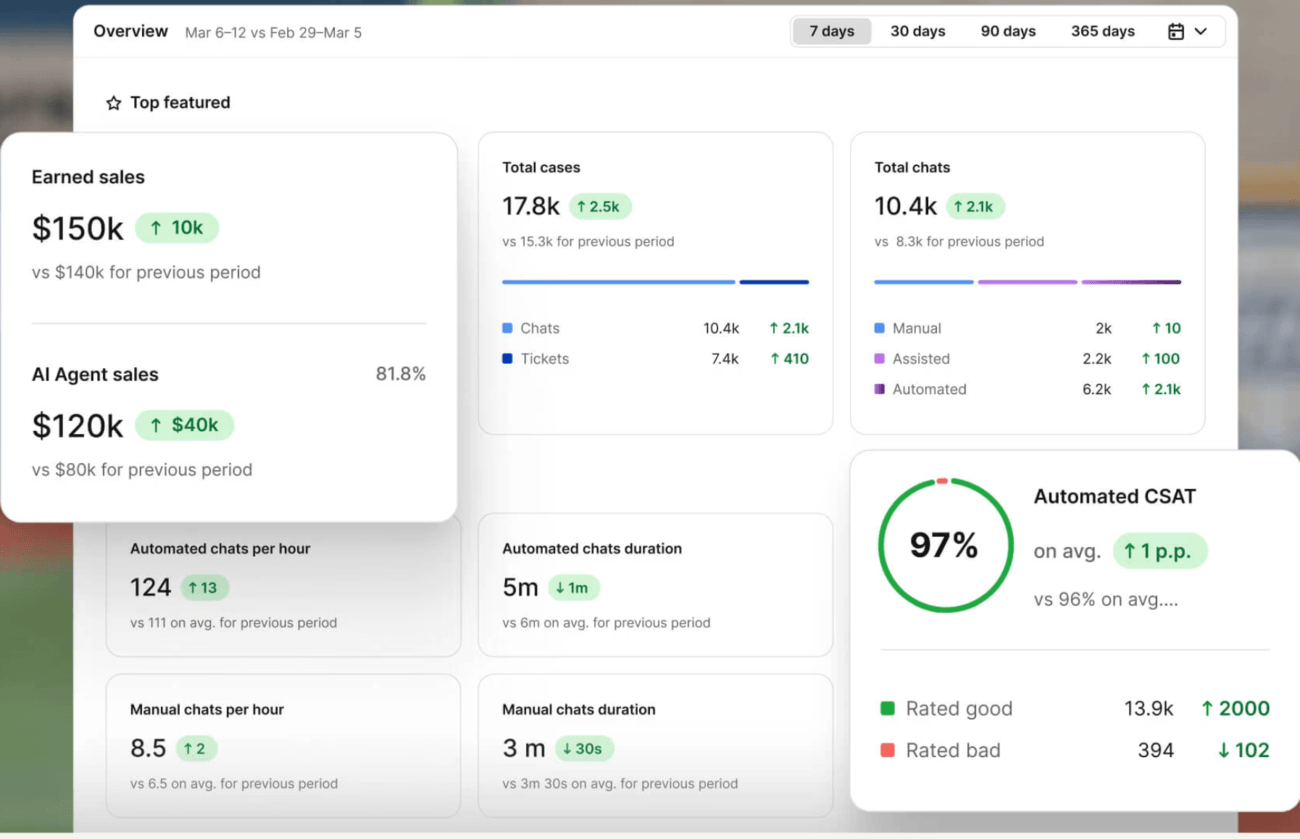
The part most partners underuse is that Text doesn't stop at operational metrics. There's a wins counter and sales attribution tracking that tie specific conversations directly to closed sales and qualified leads, so a client can see revenue generated from chats, average revenue per conversation, and conversion rates at each stage: visitor to engaged, engaged to chatting, chatting to closed sale. That's a different conversation than "here's your resolution rate." It's proof that automation isn't just cutting cost, it's showing up as attributable revenue a client's finance team can actually verify.

For partners, this is also where the case for ongoing services gets easiest to make. A quarterly review built around these performance metrics, both the operational ones and the revenue ones, gives you a natural, recurring reason to be in front of the client, checking what's working, adjusting automation rules that have drifted out of date, and spotting new opportunities for additional workflows or integrations.
It's also the fastest way to defend the value of what you sold in the first place. When a client's leadership eventually asks whether the investment was worth it, having a dashboard that already shows the before-and-after, first response time, CSAT, workload reduction, and revenue attributed to chats through the wins counter, does that job for you. That's a much easier conversation than trying to reconstruct the value from memory six months after go-live.
Packaging automation and help desk as one pitch
Automation sells well on its own. It sells even better when it's packaged with the help desk module as a single pitch: an operation that runs itself, with ticketing numbers as the proof that it actually works.
A few ways to frame that conversation:
Lead with the manager's pain, not the feature list. Nobody wakes up excited about a "no-code workflow builder." They do get excited about no longer manually triaging two hundred tickets a day.
Use the client's own numbers as the hook. Ask how many support tickets they handled last month, then walk them through what automated routing and workflows would have done with that same volume.
Position webhooks as the edge over competitors who only sell a license. Selling the integration into a client's existing ecosystem is a service that other partners simply can't offer if they stop at the base product.
Bring proof that matches the client's industry or size. A small business owner responds differently to the Funded Trading Plus story than an enterprise team will respond to Wembley's numbers.
Don't lead with every advanced feature at once. Pick the one obstacle costing the client the most time right now, and let the rest of the platform earn its place in a follow-up conversation.
Here's a short version of how that sounds in practice, adapted to whatever specifics come up in discovery: "You mentioned your team spends a chunk of every morning sorting new tickets by hand. That's exactly what automated routing removes. Every incoming request gets tagged and assigned the moment it lands, based on rules we set up together, and your managers stop starting each day by triaging a queue." That's one obstacle, one fix, no feature list recited from memory. The rest of the conversation follows naturally from there, because the client is now asking you what else the platform can take off their plate.
Common questions partners ask before they pitch this
Does this replace human agents entirely?
No. It removes the repetitive tasks and manual triage that slow agents down, so human agents spend their time on the complex issues that genuinely need judgment.
What if the client already has a self-service knowledge base?
That's a complement, not a conflict. Self-service portals handle the simplest, most repetitive customer queries. Automation and AI support pick up everything that still needs a human, or nearly does.
Is there a steep learning curve for the client's team?
The workflow builder is no-code by design, and the initial setup is where most of the complexity lives. Once workflows are published, day-to-day use is closer to flipping a switch than running an engineering project.
How does this compare to something like Salesforce Service Cloud, HubSpot Service Hub, or Zoho Desk?
Those are established players in customer service software, and clients will bring them up. The honest answer is that Text competes by treating support conversations as a source of business outcomes, not just ticket resolution, backed by the CSAT, response time, and revenue numbers above.
Is there a free plan to get a client started before a full implementation?
Yes, which makes it easier to get a client testing the platform before committing to a full-scope project, lowering the barrier for that first conversation.
Does this work for small businesses, or is it built for enterprise support operations?
Both, and that's part of the appeal. A small business gets a self-service portal and basic automation running quickly with minimal setup. A larger operation layers on advanced features like custom API integrations, multi-variable routing rules, and dedicated reporting, without switching platforms as they grow.
How quickly can a client expect to see results after the initial setup?
Most of the workspace, routing, and Copilot features start showing impact within the first few weeks, since they act on conversations as soon as they're connected. More advanced automation, like multi-step workflows tied to specific business logic, tends to need a short tuning period as real customer conversations reveal edge cases the client didn't anticipate at kickoff.
What happens to existing customer data during migration?
Data, workflows, and open tickets move over as part of a standard implementation, so a client's team isn't starting from a blank customer list. That's a meaningful difference from a cold start, since historical customer history stays intact instead of resetting the moment a client switches tools.
Where to go from here
Customer service automation software isn't a hard sell anymore. Support teams are already stretched, and the client on the other end of your next call already knows it. What they need is someone who can walk them from "we know we need this" to "here's exactly what changes on Monday morning."
That's the conversation this module sets you up to have. One workspace with full context. AI support that makes every agent perform like your best one. Automation that runs without a manager watching every step. And integrations that make the whole thing fit into whatever the client is already running.
If you take one thing from this into your next call, make it this: don't pitch the feature list, pitch the specific Monday morning that changes for that client. The manager who stops manually triaging tickets. The agent who stops digging through five tabs for one customer's order number. The owner who stops losing repeat customers because nobody remembered their last conversation. The platform does the technical work. Your job is naming the moment it fixes.
Everyone has AI. What you're selling is AI that actually does something, backed by results a client can check for themselves.