
AI Agent Playground
Learn how to test your AI Agent in the Playground. See the sources, Skills, and reasoning behind every reply before customers do. Start testing today.
 Wiktoria SmołaUpdated 3 min read
The Playground lets you test your AI Agent before any customer sees an answer. For every reply, you can see which knowledge sources the AI Agent used, which Skills it ran, and how it reached its answer. Test chats don't count toward your AI resolution limit or affect your production stats, so you can fine-tune your AI Agent with confidence before going live.
What is the AI Agent Playground?
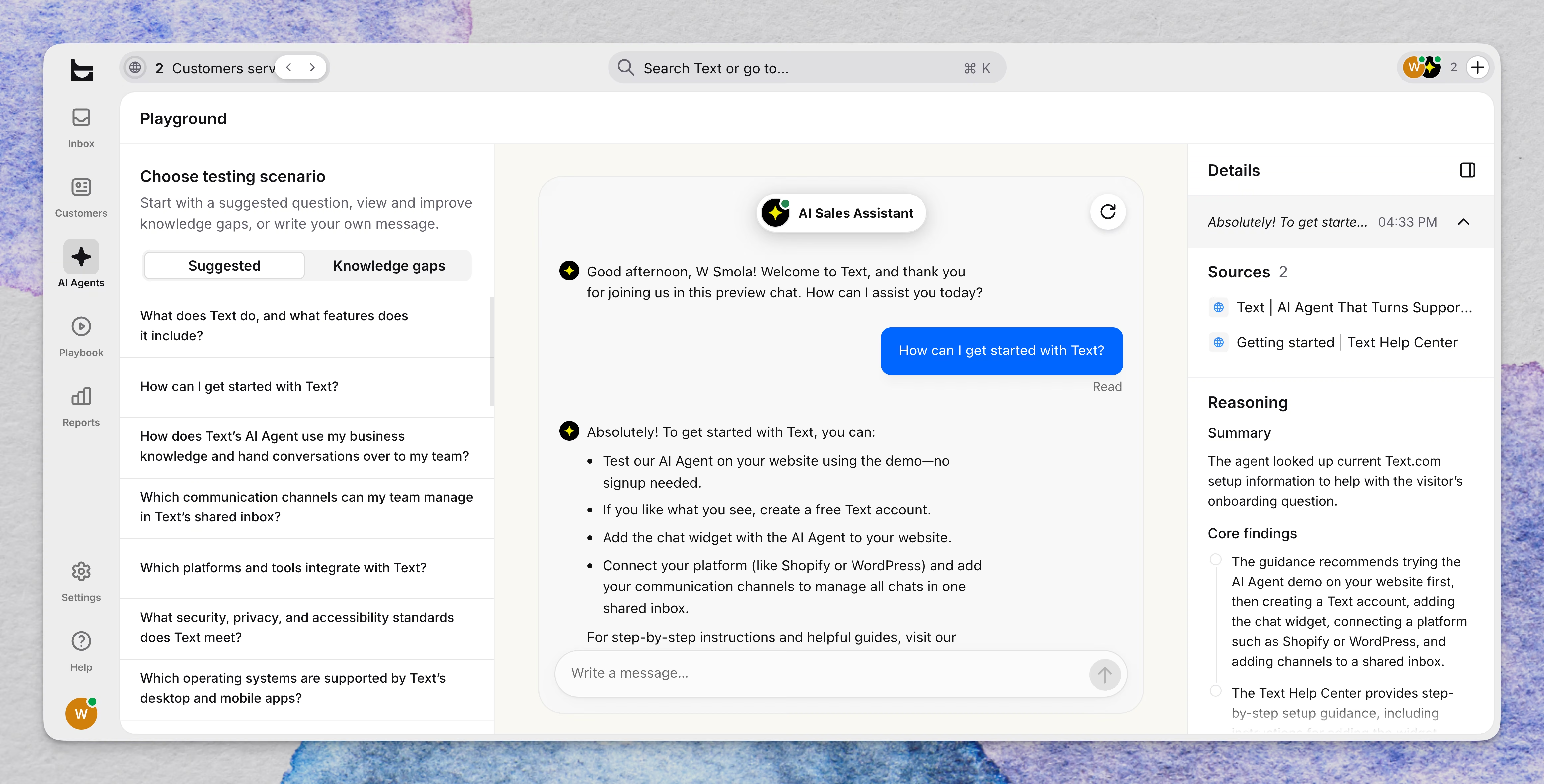
The Playground is a tab in the AI Agent section that lets you check how your AI Agent responds before customers ever see it. It allows you to chat with the AI Agent and open the details behind each reply, so you can spot missing knowledge or wrong answers early.
You can start from a suggested question, pick up a question your AI Agent couldn't answer, or write your own message. Each reply comes with the knowledge sources the AI Agent drew on, the Skills it ran, and a reasoning log, so you see not only what the AI Agent said but why. Use the Playground whenever you want to check your setup before going live.
How do you test your AI Agent in the Playground?
Select AI Agents in the main navigation, then choose the AI Agent you want to test.
Go to the Playground tab in the AI Agent section.
Choose a question to test. In the left panel, open the Suggested tab or the Knowledge gaps tab, then select a question. It's added to the chat and sent right away. Suggested questions are generated from your knowledge sources. The Knowledge gaps tab lists questions your AI Agent couldn't answer.
Or write your own message. Type a question the way a customer would in the Write a message field. A message can be up to 2,000 characters.
Read the reply. The AI Agent answers in the real widget, so you see what a customer would see.
Open the answer details. Open the details for any reply to see the knowledge sources, Skills, and reasoning log behind it.
Refine and test again. If an answer is off, update your knowledge sources, then test the same question again.
What can you see behind each reply?
The answer details show how your AI Agent built a reply.
Knowledge sources
See which knowledge sources the AI Agent drew on and select a source to open its document. Questions your AI Agent couldn't answer appear in the Knowledge gaps tab of the Playground. The more you test, the more gaps it can find. To fill a gap, select the three-dot icon next to a question in that tab and provide the missing information. To learn more, read about Knowledge Gaps. To add or update sources, see Configuring your knowledge sources.
Skills
See which Skills the AI Agent ran. Use this view to confirm that a Skill starts when you expect it to.
Full testing of Custom Skills isn't available yet. To learn how Skills work alongside your voice prompt, read Custom skills vs. Custom voice.
Reasoning log
Read a walkthrough of how the AI Agent reached its answer and whether the chat was resolved. Use it to understand why an answer came out the way it did.
Frequently asked questions
Do Playground chats count toward my AI resolution limit?
No. Test chats don't count toward your AI resolution limit and don't affect your production stats, so testing doesn't use up the resolutions your plan includes. To learn how real chats are counted as resolutions, read AI Agent resolutions.
Can I test Custom skills in the Playground?
Not fully yet. The Playground shows which Skills your AI Agent ran, but full testing of Custom Skills isn't available yet. For now, open the answer details to confirm which Skills ran for each reply, and check how your Custom Skills perform in real chats.
What should I do if I find a wrong answer?
Open the answer details and check which knowledge sources the AI Agent used. If a source is missing or outdated, add or update it, then test again. You can also open the Knowledge gaps tab, select the three dots icon next to a question, and provide the missing knowledge. To review answers from real chats, open the Archive.