
Conversion Radar: Turns buying intent into action
Conversion radar spots buying intent among live visitors and pairs each opportunity with a ready campaign. Learn how to publish it and use AI personalization.
 Izabela KubikUpdated 3 min read
Conversion radar picks up on conversion moments before they slip away, monitoring visitor traffic in real time to spot buying intent. Each opportunity comes with a tailored campaign that engages the visitor at the right moment, even when you're away.
What is Conversion radar?
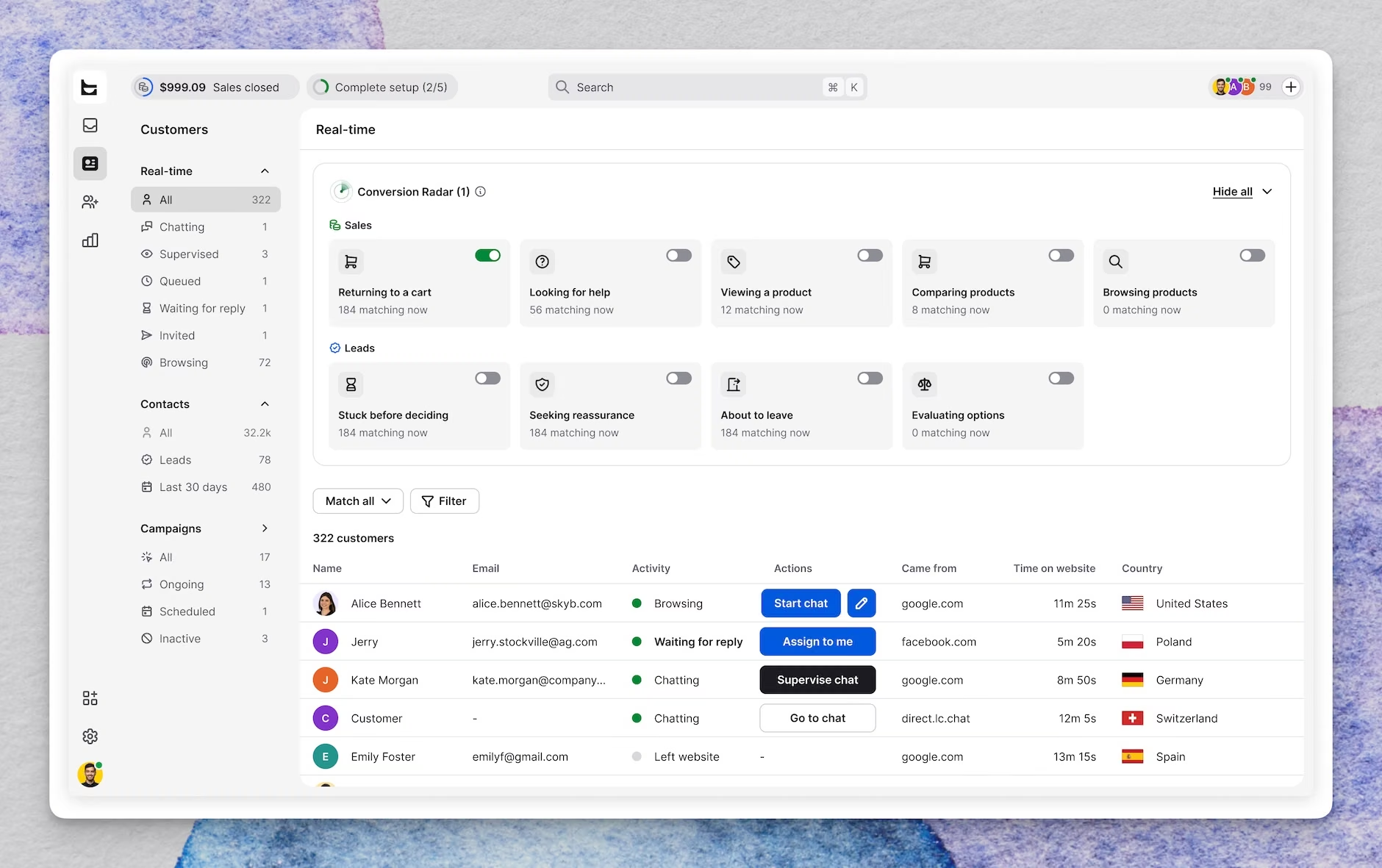
Conversion radar is a real-time feature in Text that detects when a website visitor shows a buying or lead signal. It lists each moment as a conversion opportunity and pairs it with a ready-made campaign. Once you publish a campaign, Conversion radar automatically triggers it for every visitor who meets its criteria, engaging them at the right moment.
Where do you find Conversion radar?
Conversion radar sits at the top of Customers > Real-time in Text. It appears once there are customers on your site. To learn more about the rest of this view, read Contacts and Real-time customers.
What can you do with Conversion radar?
The radar groups opportunities into two categories:
Sales: visitors who show buying intent, such as returning to a cart or comparing products.
Leads: visitors who hesitate before committing, such as those seeking reassurance or who are stuck before deciding.
Each opportunity comes with a campaign matched to that moment. Here are the main ways to use them.
Turn product interest into purchases
Help shoppers find the information they need to choose the right product and check out with confidence.
Give answers to hesitant shoppers
Run a campaign to give customers the answers they need and the confidence to buy.
Turn hesitation into action
When prospects stall before deciding, run a campaign to remove the last blocker and move them forward.
How to launch a campaign from Conversion radar
Go to Customers > Real-time.
Select an opportunity in Conversion radar.
Preview the campaign. Check the message and how it appears to visitors.
Click Publish or Enable.
Once live, the campaign carries a Managed by Conversion radar tag in your campaign list. Read Campaigns to manage it alongside your other campaigns. To build a campaign yourself instead, follow Adding a new Campaign.
How does AI personalization work in Conversion radar?
When your team has an AI Agent enabled, Personalize with your AI Agent is on by default in the campaign preview. Instead of a single static message, the AI Agent writes the message for each visitor at the moment the campaign's conditions match.
The AI Agent uses the page the visitor is on and what Text knows about them. For example, a visitor comparing several products sees a message that mentions those products, not a generic line.
What does the AI Agent write?
For now, the AI Agent writes the title and subtitle. Buttons and images stay fixed.
What happens if your AI Agent is turned off?
The campaign shows Requires an active AI Agent and does not send. It starts sending again once the AI Agent is back on. To set up your AI Agent, read AI Agents.
Good to know
Content of Conversion radar campaigns can't be edited, because every visitor gets a different message.
You can still rename a campaign, turn it off, or switch AI personalization on or off.
Campaigns launched from the radar are tagged Managed by Conversion radar.
Frequently asked questions
Why don't I see Conversion radar?
The Conversion radar appears at the top of Customers > Real-time once customers are on your site. If your site has no live visitors, the radar stays hidden. Check that your widget is installed and that visitors are reaching your pages, then reload Real-time to see whether it appears.
Why does Conversion radar say it is still learning?
The radar shows a "still learning" state until it detects the first opportunity in your live traffic. Opportunities depend on what visitors do on your site, so the time it takes varies. Once the first one is detected, the radar lists it with a ready campaign.
Why can't I edit the message in a Conversion radar campaign?
Campaigns published from Conversion radar are designed to address specific conversion opportunities. Editing their content could make them less effective or prevent them from addressing their intended use case.
Which parts of the message does the AI Agent write?
The AI Agent writes the campaign's title and subtitle. Buttons and images stay fixed. It builds the message from the page the visitor is on and what Text knows about them, at the moment the campaign's conditions match.